 Hack the Route Start free Open app
 The idea
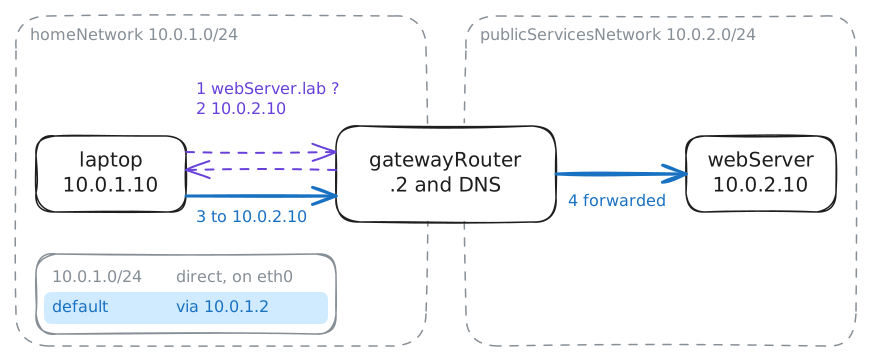
A laptop at home, the home router (its way out, which also looks up names), and a web server on another network. Follow one request from the laptop to the server, one piece at a time: this home network lab runs on real Linux machines.
Steps
-
Where the laptop is
Every device on a network has a number, like a street address, so that packets for it know where to go. Before the laptop can talk to anyone, it needs its own. Ask the laptop for it.
laptop:~# ip -4 addr show eth0
-
The way out
The web server,
10.0.2.10, is outside the laptop's10.0.1.network, and the laptop can only reach its own network directly. So it needs one place to hand everything else to. Read where the laptop sends packets.laptop:~# ip route
-
Names become addresses
People type names like
webServer.lab, but every packet carries an address, so a name must become an address before anything is sent. Ask for the address behind the name.laptop:~# dig +short webServer.lab
-
Talk to the server
You have the address and the way there; a browser does exactly this next. Ask the web server for its page over HTTP, the language of web pages.
laptop:~# curl -s http://webServer.lab
-
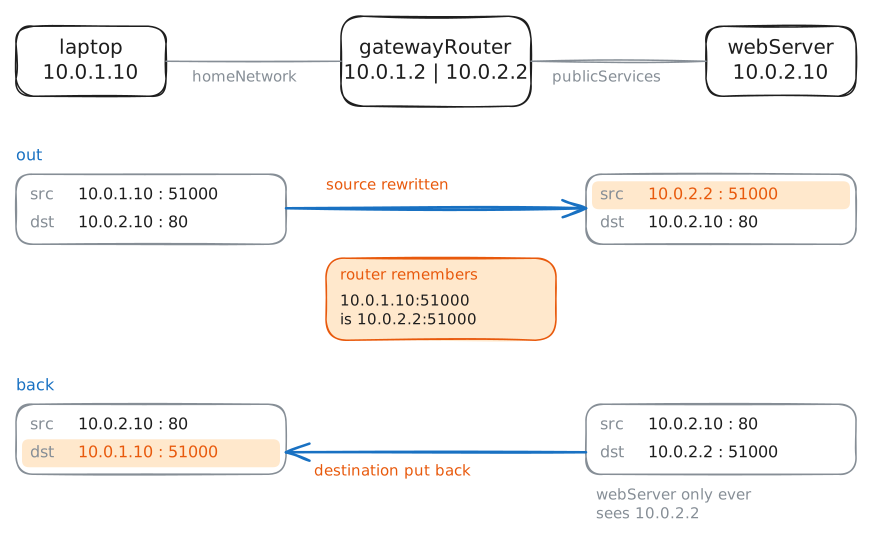
The router hides the laptop
The laptop's
10.0.1.10is a private address: the internet never sends replies to it. So who does the server see? Fetch the page again while the server records what reaches it.laptop:~# curl -s http://webServer.lab
-
A server goes down
Servers go down, and the symptom tells you where to look. The lab turns the web server off; ask for its name and its page, then it comes back on.
laptop:~# dig +short webServer.lab
laptop:~# curl -sS -m 5 http://webServer.lab
laptop:~# curl -s http://webServer.lab