 Hack the Route Start free Open app
 The idea
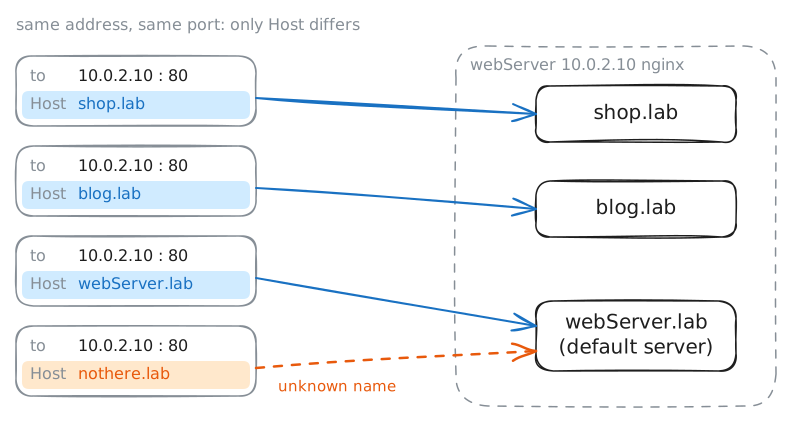
HTTP requests are lines of text: the client writes a few lines, the server writes some back, over one TCP connection. Here the client is the laptop, and webServer is one nginx server that carries three sites.
Steps
-
A request typed by hand
Every browser and app speaks the same few lines of text, so you can speak them yourself.
ncopens a TCP connection to webServer's Port 80 and sends each line you type. Type a request for the front page in HTTP/1.1, one line at a time, and read what comes back.laptop:~# nc webServer.lab 80 laptop:~# nc webServer.lab 80
-
Status codes: found, missing, moved
A program reading the answer needs to know at once whether it worked, without reading the page. The number in the status line says so. Ask for a missing page, then a moved one, showing only the status line and headers.
laptop:~# curl -sI http://webServer.lab/missing
laptop:~# curl -sI http://webServer.lab/old-page
laptop:~# curl -siL http://webServer.lab/sale
Pro
4 more steps in the app
- Methods: what the client wants done
- One address, three sites: the Host header
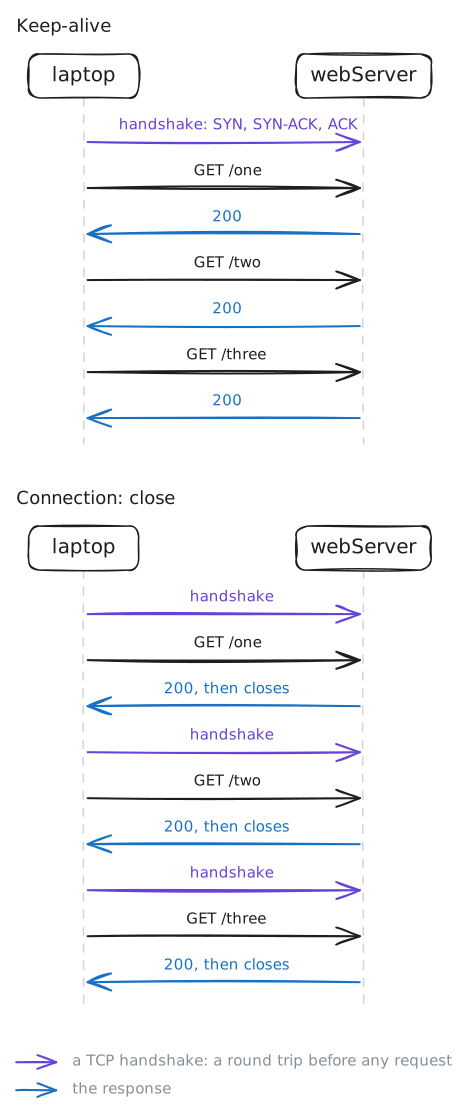
- Keep-alive: three requests, one connection
- Connection: close: a handshake per request