 Hack the Route Start free Open app
 The idea
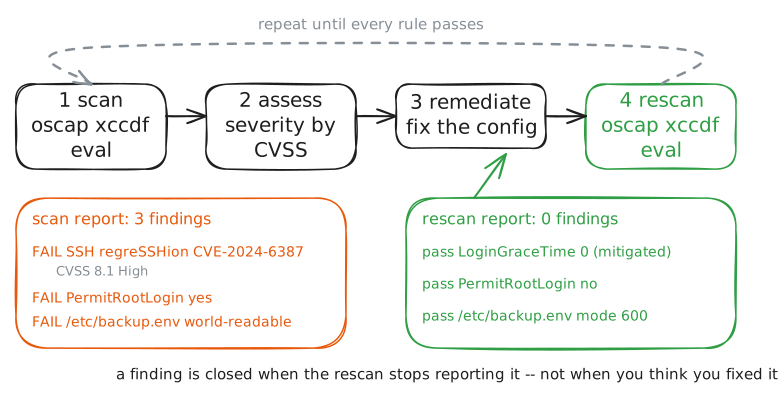
Vulnerability management is a loop: scan a host against a security baseline, fix the worst findings first, and rescan until it is clean. You defend appHost, a server you inherited, scanning it with OpenSCAP and watching its files with AIDE, while the admin workstation checks its web page stays up.
Steps
-
Scan: a credentialed scan of the host you run
You cannot fix what you have not found, so the loop starts with a scan. You run
oscapon the host itself, with full access to its realsshd_configand file permissions: a credentialed scan. It checks the host against a small baseline and prints pass or fail for each rule.appHost:~# oscap xccdf eval --profile xccdf_org.netlab_profile_baseline --results /root/scan1.xml /root/baseline.xccdf.xml
-
Assess: read each finding's severity and fix the worst first
A list of findings is not a plan. Each rule carries a severity, and the regreSSHion rule also carries a real CVE and its CVSS base score. Severity is how you prioritise: do the high-severity item first.
appHost:~# grep -E "Rule id|severity|CVE-2024|CVSS" /root/baseline.xccdf.xml
Pro
3 more steps in the app
- Remediate and rescan
- Baseline the host's files with AIDE
- Detect tampering, then restore