 Hack the Route Start free Open app
 The idea
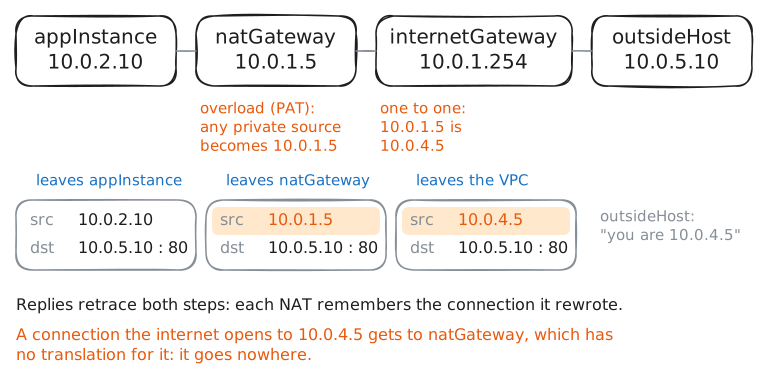
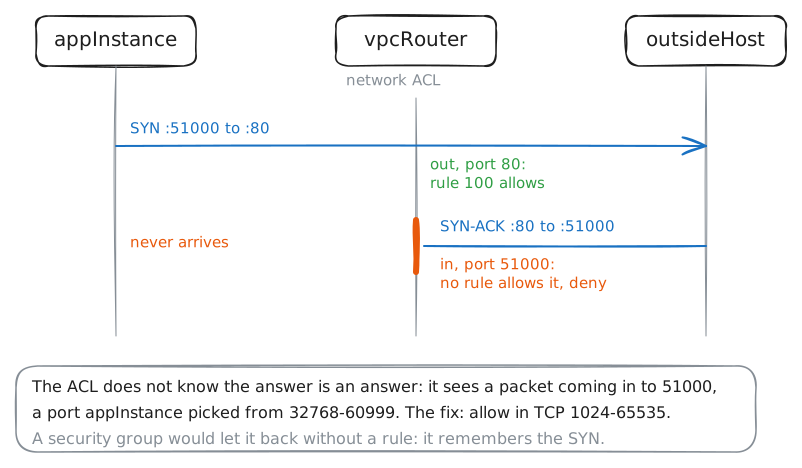
A cloud VPC explained in miniature: subnets, route tables, gateways and filters, all software a provider runs for you. webInstance serves the public, appInstance and its database dbInstance stay private, and outsideHost on the internet answers with the address it saw.
Steps
-
Two subnets, two route tables
A VPC is your own network inside a cloud, split into subnets, each with its own route table. The table's default route, where internet traffic goes, is what makes a subnet public or private. Read both, and vpcRouter's.
webInstance:~# ip route
appInstance:~# ip route
vpcRouter:~# ip route
-
The internet gateway maps a public IP
The internet routes only the provider's public addresses, 10.0.4.0/24, to the internet gateway, so an answer to a private address has no way back. Give webInstance the public IP 10.0.4.10 there: one line rewrites it on the way out, one on the way in.
webInstance:~# curl -sS -m 3 http://10.0.5.10/
internetGateway:~# iptables -t nat -A POSTROUTING -s 10.0.1.10 -j SNAT --to-source 10.0.4.10
internetGateway:~# iptables -t nat -A PREROUTING -d 10.0.4.10 -j DNAT --to-destination 10.0.1.10
webInstance:~# curl -sS -m 3 http://10.0.5.10/
outsideHost:~# curl -s -m 3 http://10.0.4.10/
Pro
4 more steps in the app
- A NAT gateway for the private subnet
- Security groups: stateful, on the instance
- Network ACLs: stateless, on the subnet
- Everything here is software