 Hack the Route Start free Open app
 The idea
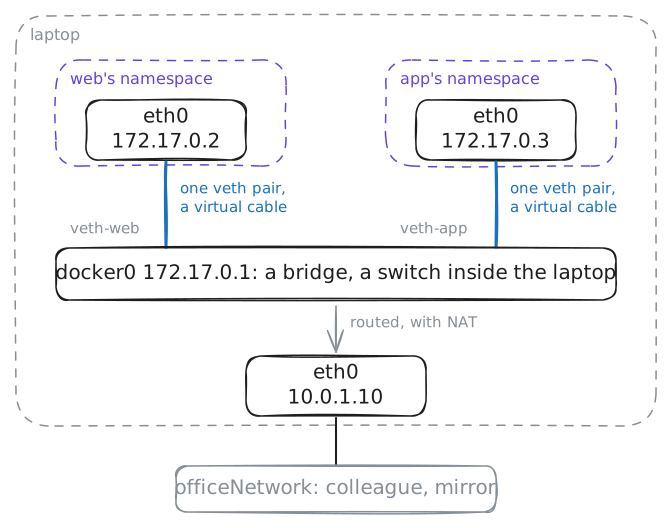
Docker networking by hand: each container gets its own network, a cable into a bridge, a way out and a way in. The laptop runs two containers, web and app; a colleague and a mirror (it answers with the address it saw) share the office network.
Steps
-
A container's own network
Each container lives in its own network namespace: a separate copy of the network, with its own cards and addresses. That is what keeps a container from seeing or touching the laptop's network.
ip netns execruns a command inside one.laptop:~# ip netns list laptop:~# ip netns exec web ip -br addr show up laptop:~# ip -br addr show up
-
A cable with two ends
A new namespace has no way out, so each container is given a veth pair: two cards joined like the ends of a cable, whatever goes in at one end comes out at the other. One end is the container's
eth0; find the other.laptop:~# ip -br link show type veth
-
docker0 is a switch
The laptop's cable ends plug into
docker0, a bridge: a switch in software that joins web and app into one network. It learns which MAC address is behind each cable, to send traffic only where it goes. Then app's cable comes out: find it and plug it back.laptop:~# ip netns exec app ping -c 2 -W 2 172.17.0.2 laptop:~# bridge fdb show br docker0 dynamic laptop:~# ip netns exec app ping -c 2 -W 2 172.17.0.2 laptop:~# ip link set veth-app master docker0
-
Out through NAT
app asks the mirror,
10.0.1.30. Its gateway is docker0, so the laptop passes the request on, but nobody in the office knows the way back to172.17.0.3: that address exists only inside the laptop. So the laptop must lend app its own address on the way out, with NAT.laptop:~# ip netns exec app curl -sS -m 3 http://10.0.1.30/ laptop:~# iptables -t nat -A POSTROUTING -s 172.17.0.0/16 ! -o docker0 -j MASQUERADE
-
Publish a port
The colleague cannot reach
172.17.0.2either: it exists only inside the laptop. So the laptop passes one of its own ports, 8080, on to web's port 80: a port forward, which Docker calls a published port (docker run -p 8080:80).colleague:~# curl -sS -m 3 http://10.0.1.10:8080/ laptop:~# iptables -t nat -A PREROUTING -p tcp --dport 8080 -j DNAT --to-destination 172.17.0.2:80 colleague:~# curl -s -m 3 http://10.0.1.10:8080/