 Hack the Route Start free Open app
 The idea
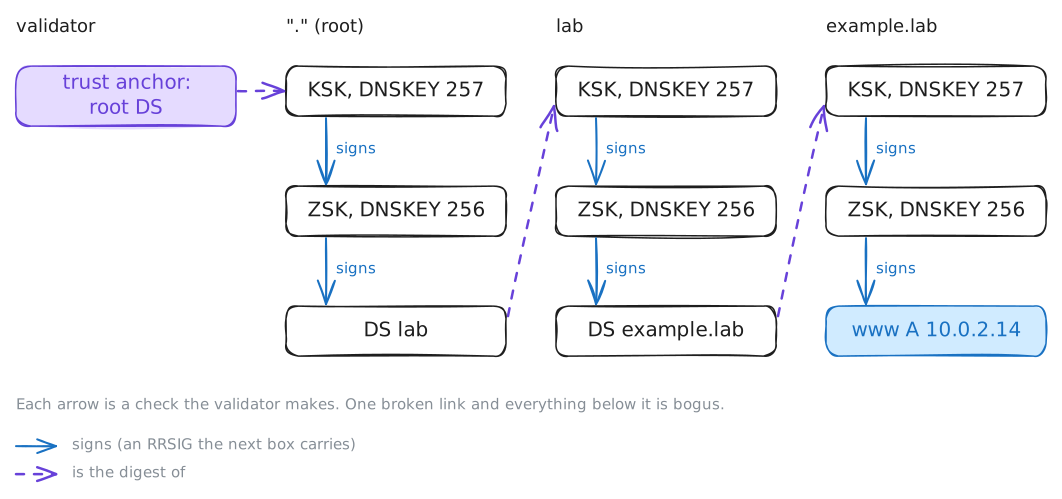
With DNSSEC validation, a zone signs its records and a validating Recursive resolver checks each signature up a chain of keys to one it already trusts, so a forged or altered DNS answer fails instead of being believed. Here a laptop asks two resolvers, validator and plainResolver, for names that exampleServer signs, while an attacker forges answers through homeRouter.
Steps
-
Two resolvers, one checks
A resolver's answer is only as true as its check, so compare one that checks with one that does not. The laptop has two resolvers.
validator(10.0.1.11) checks the signatures on every answer: DNSSEC validation.plainResolver(10.0.1.12) does not.laptop:~# dig @10.0.1.11 www.example.lab laptop:~# dig @10.0.1.12 www.example.lab
-
The signature: RRSIG
To check an answer, a resolver needs the signature and the key that made it, so look at both. A signed zone adds an RRSIG, a signature, to each set of records. Its public keys are DNSKEY records, one with flags 257, one with 256.
laptop:~# dig +dnssec www.example.lab
laptop:~# dig +multi DNSKEY example.lab
Pro
4 more steps in the app
- The chain of trust: DS and the trust anchor
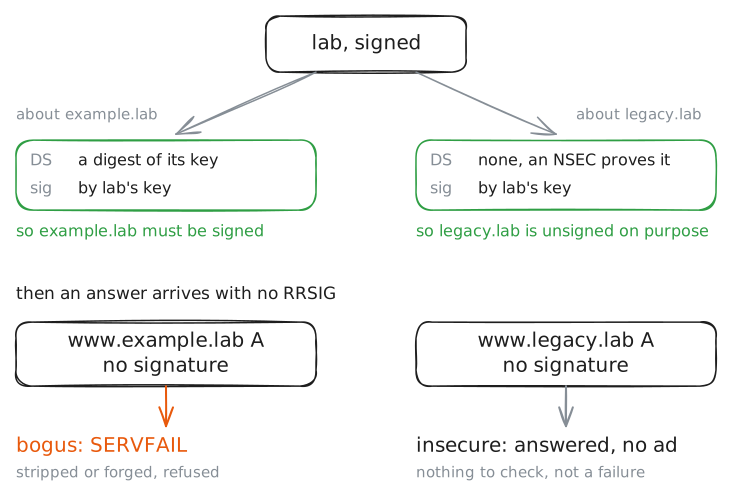
- Unsigned is not forged
- A forged answer on the path
- A tampered zone fails until the owner signs it