 Hack the Route Start free Open app
 The idea
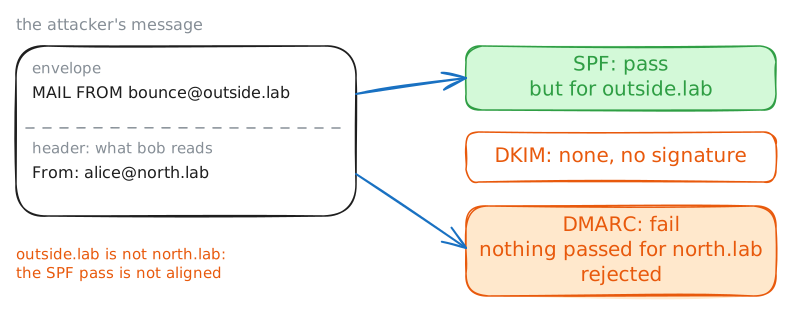
Email authentication: a domain publishes in DNS who may send its mail (SPF), the key that signs it (DKIM) and what to do with mail that fails (DMARC), and a receiving server checks all three. Here mailNorth sends alice's mail for north.lab, northDns publishes north.lab's policies, mailSouth checks what reaches bob, and an attacker forges.
Steps
-
The policies are TXT records in DNS
SMTP lets any server claim any sender. So north.lab vouches for its mail in DNS with three TXT records: who may send (SPF), the signing key (DKIM), and what to do with failures (DMARC).
bobLaptop:~# dig +short TXT north.lab
bobLaptop:~# dig +short TXT _dmarc.north.lab
bobLaptop:~# dig +short TXT lab._domainkey.north.lab
-
mailNorth signs what its office sends
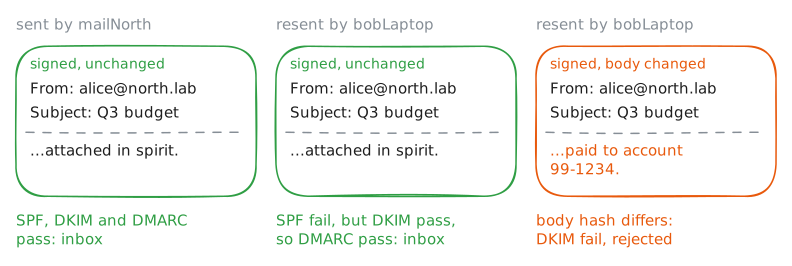
A signature lets any receiver check that north.lab's server sent the message unchanged, whoever carried it. alice sends bob a report. mailNorth adds a DKIM-Signature header: north.lab's private key signing chosen headers and a hash of the body. Then bob reads it.
aliceLaptop:~# curl smtp://mailNorth.lab --mail-from alice@north.lab --mail-rcpt bob@south.lab --upload-file ~/report.eml
bobLaptop:~# curl -s -u bob:hunter2 'imap://mailSouth.lab/INBOX;UID=1'
Pro
4 more steps in the app
- mailSouth checks all three and writes down the verdict
- A forger claims to be alice
- Passing SPF is not enough: alignment
- A signature covers content, not the sender