 Hack the Route Start free Open app
 The idea
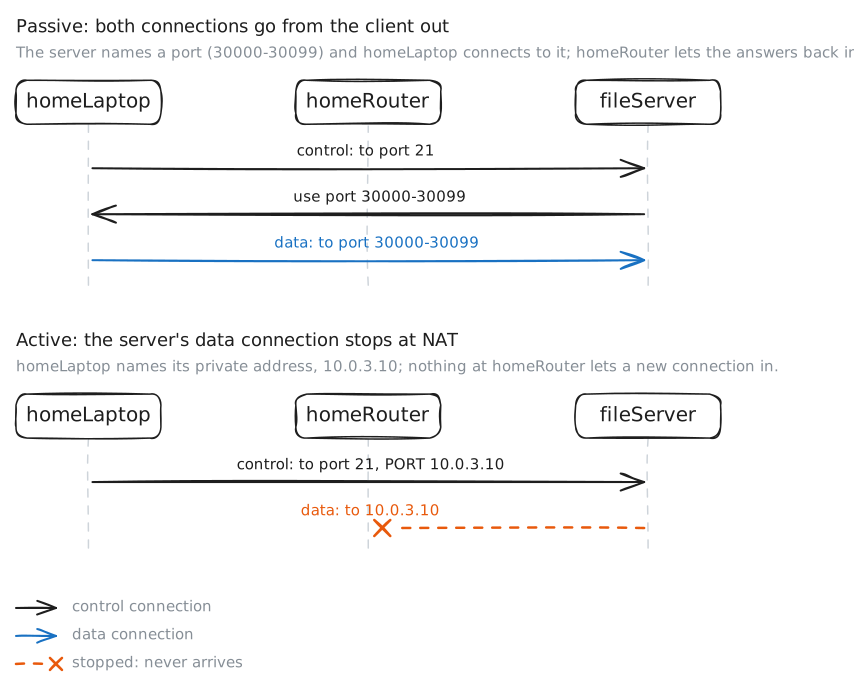
FTP active vs passive: FTP talks on one connection and moves files on another, and NAT decides which mode works. officeLaptop reaches fileServer through officeRouter; homeLaptop reaches it from a house, behind homeRouter.
Steps
-
The control channel
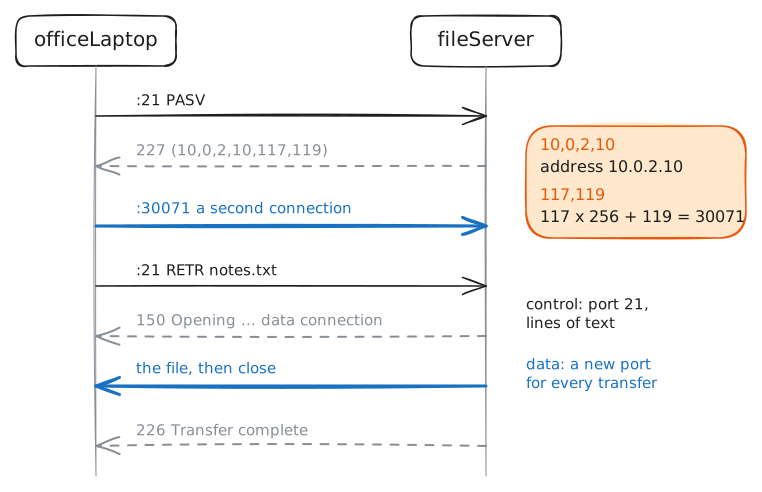
Before any file moves, client and server must agree who you are and what you want. FTP, the File Transfer Protocol, takes those commands on Port 21, as lines of text. Log in to fileServer as alice by typing the commands yourself, each answered with a three-digit code.
officeLaptop:~# nc fileServer.lab 21
-
A file needs a second connection
Commands keep flowing while a file moves, so the file never comes down port 21. The server names a port; curl opens a second connection to it. fileServer records who opens each connection, by its first packet, the SYN.
officeLaptop:~# curl -sv --disable-epsv ftp://alice:s3cret@fileServer.lab/report.txt
Pro
4 more steps in the app
- The server connects back
- Behind NAT, active mode breaks
- Behind NAT, passive mode works
- Listings and uploads too