 Hack the Route Start free Open app
 The idea
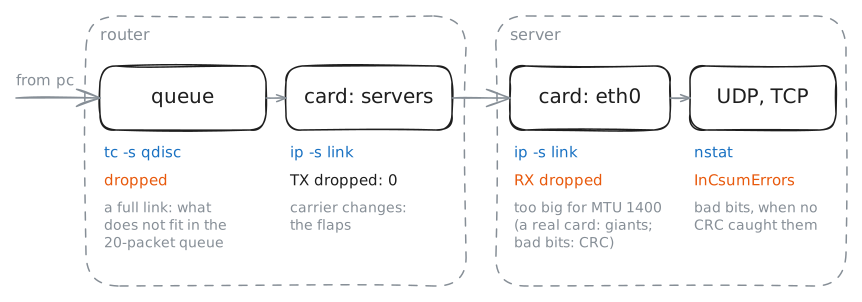
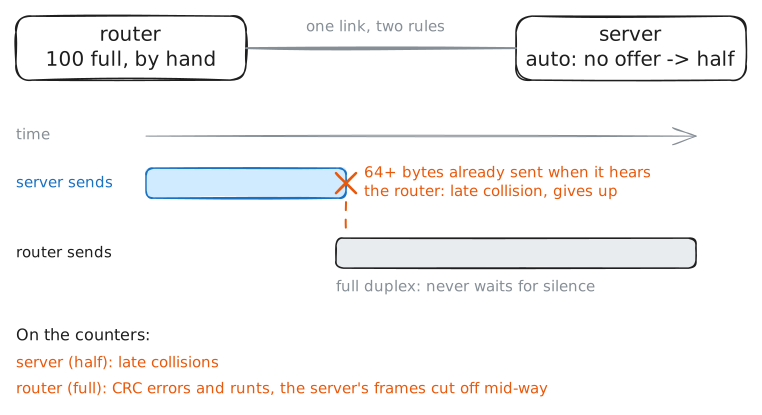
pc reaches a server through a Router. Every card counts what went wrong: drops, errors, oversized frames and flaps. Read the counters twice and compare.
Steps
-
Where the counters are
A card records trouble in its counters, so find them before anything breaks. Read the counters of the router's card on the servers network: packets and bytes, and beside them the errors and drops, each by kind.
router:~# ip -s -s link show dev servers
-
A full link: utilization and output drops
A busy link loses packets with nothing broken, and only the counters say so. The router's card to the servers now sends at most 10 Mbit/s, and pc pushes 20 Mbit/s through it. Read the queue in front of the card, before and after the burst.
router:~# tc -s qdisc show dev servers
router:~# tc -s qdisc show dev servers
router:~# ip -s link show dev servers
Pro
3 more steps in the app
- Giants: a frame bigger than the MTU
- Damaged frames: CRC on a wire, checksums here
- Flaps: the line going down and up