 Hack the Route Start free Open app
 The idea
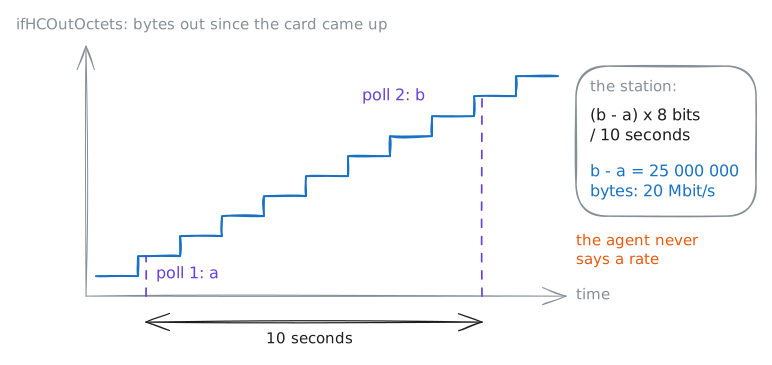
nms, a management station, asks coreRouter, a Router, and fileServer for their counters over UDP, while a laptop sends traffic. Two polls, some seconds apart, make a rate.
Steps
-
Ask a device who it is
Every monitoring tool starts by asking devices questions, so ask one. coreRouter and fileServer run an SNMP agent: a small server that answers questions about its device. nms is the station that asks. Ask the router for its name and where it is.
nms:~# snmpget -v2c -c n3tops-ro coreRouter.lab sysName.0 sysLocation.0
nms:~# snmpget -v2c -c n3tops-ro -On coreRouter.lab sysName.0
-
The interface table
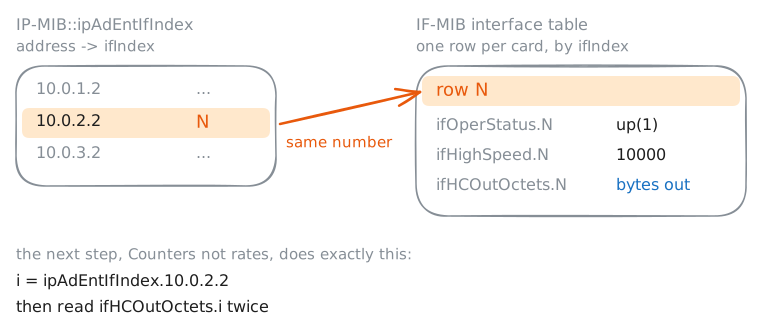
Graphs are drawn per card, so a station first learns which card is which. Most of what it graphs is in IF-MIB: one row per card, numbered by ifIndex. List the router's cards, then find which one holds 10.0.2.2, its address on serverNetwork.
nms:~# snmpwalk -v2c -c n3tops-ro coreRouter.lab ifDescr
nms:~# snmpwalk -v2c -c n3tops-ro coreRouter.lab IP-MIB::ipAdEntIfIndex
Pro
4 more steps in the app
- Counters, not rates
- The community string travels in the clear
- SNMPv3: a user, a password, encryption
- Traps: the device speaks first