 Hack the Route Start free Open app
 The idea
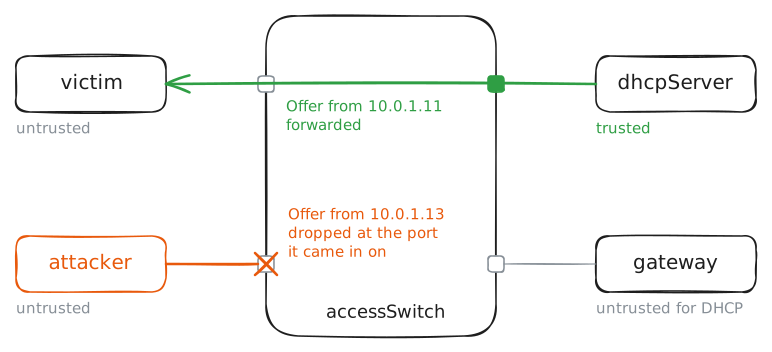
Rogue DHCP, ARP spoofing and DHCP starvation all enter the same way — a device on a desk port sending frames nobody checks — so the place to stop all three is the access switch, the one box every desk frame crosses first.
Steps
-
Trusted ports and untrusted ports
The switch sorts its ports into two lists. Only the real DHCP server's port is trusted to send DHCP offers; it and the gateway are trusted for ARP, since their addresses are set by hand. Every desk is untrusted — yet honest traffic still flows.
accessSwitch:~# nft list set bridge netlab-security dhcp-trusted
accessSwitch:~# nft list set bridge netlab-security arp-trusted
victim:~# curl -s --max-time 5 http://10.0.2.10/
-
The binding table
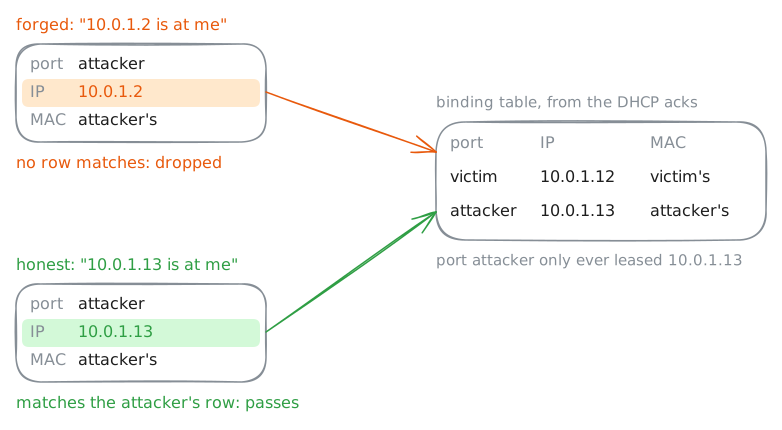
When the victim and attacker leased their addresses, the DHCP acknowledgements arrived on the trusted port, so the switch believed them and wrote each down: this MAC, this IP, behind this port, for this long. That binding table is the ground truth ARP inspection checks against later.
accessSwitch:~# nft list set bridge netlab-security dhcp-bindings
victim:~# ip -4 -br addr show eth0
victim:~# ip -br link show eth0
Pro
4 more steps in the app
- A rogue DHCP server, cut off at its port
- ARP spoofing, dropped by ARP inspection
- Port security: one MAC address per desk
- Bringing an err-disabled port back