 Hack the Route Start free Open app
 The idea
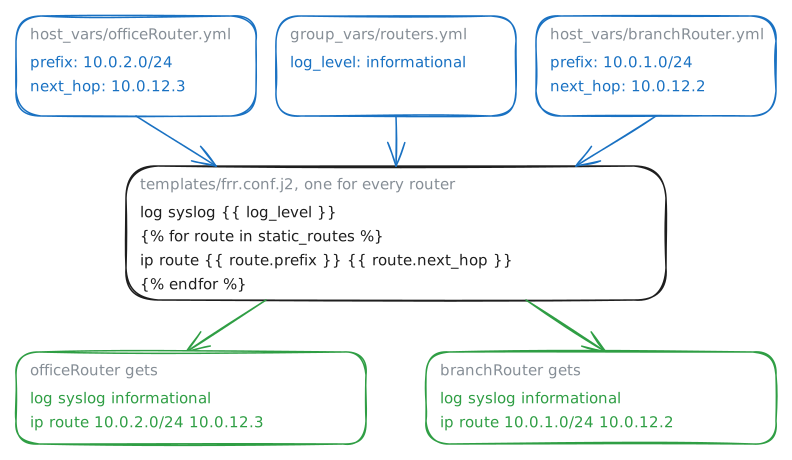
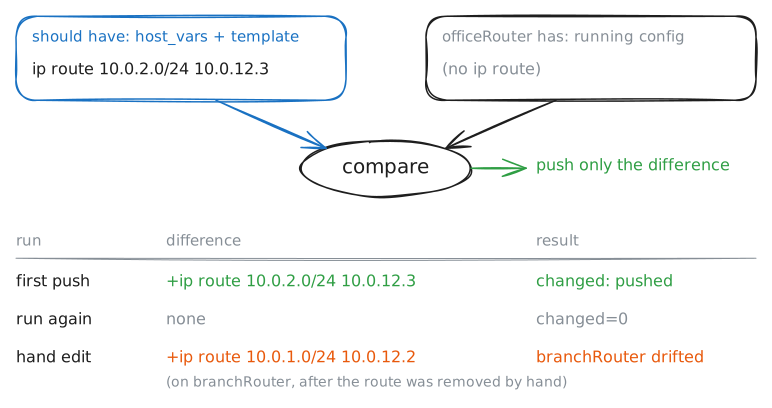
Network automation writes each router's wanted configuration down once, as files, and lets a tool push it. Here Ansible, on controlNode, gives officeRouter and branchRouter the static routes that let the laptop reach webServer, then catches a change made by hand.
Steps
-
The routers know only their own networks
Start from nothing, so every route you see later is Ansible's work. Ping webServer from the laptop, then print officeRouter's running config: what its routing software, FRR, runs now.
laptop:~# ping -c 2 -W 1 10.0.2.10
officeRouter:~# vtysh -c 'show running-config'
-
The inventory: what Ansible manages
Ansible needs to know which devices it manages and how to log in to them: that list is the inventory, devices in groups. Read it, then check Ansible can manage the
routersgroup.controlNode:~# cat /etc/ansible/hosts.yml controlNode:~# ansible routers -m ping
Pro
4 more steps in the app
- Intent as data: variables and a template
- Push it
- Run it again: changed=0
- Drift: a change made by hand