 Hack the Route Start free Open app
 The idea
officeRouter, coreRouter and branchRouter, three routers in a triangle, find their routes with RIP: each tells its neighbours what it can reach and how far. A laptop in the office reaches a web server at the branch; good news spreads fast, bad news slowly.
Steps
-
Routes by hop count
Read officeRouter's RIP table, then trace the laptop's way to the web server. Nobody typed these routes: the routers told each other, so the table shows who said what and how far away it is.
officeRouter:~# vtysh
laptop:~# traceroute -n -q1 -w2 10.0.3.10
-
Telling the neighbours, every 5 seconds
Each router sends its whole table to its neighbours on a timer. Record coreRouter's updates on officeRouter for 12 seconds. Repeating it all, changed or not, is how a quiet neighbour gets noticed.
officeRouter:~# timeout 12 tcpdump -n -v -i officeToCore udp port 520 and src 10.0.12.3
Pro
3 more steps in the app
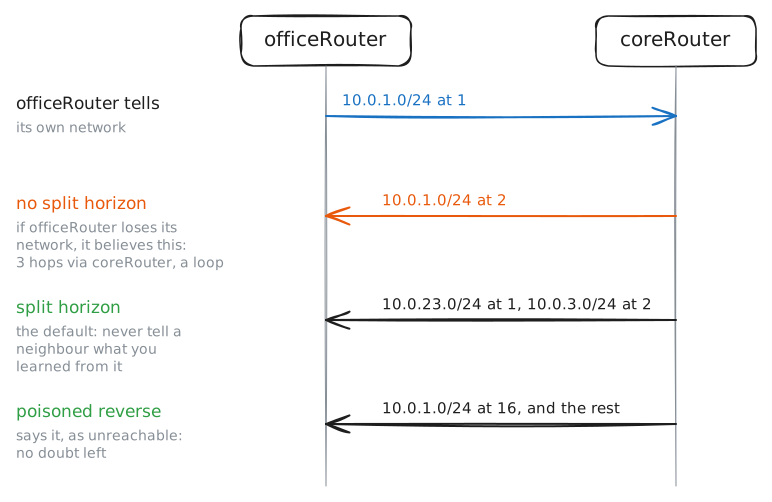
- Split horizon and poisoned reverse
- A router goes silent
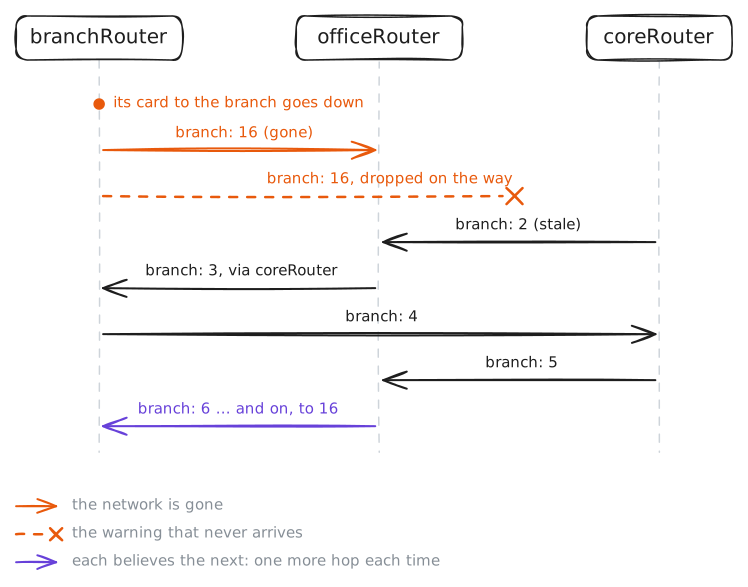
- Counting to infinity