 Hack the Route Start free Open app
 The idea
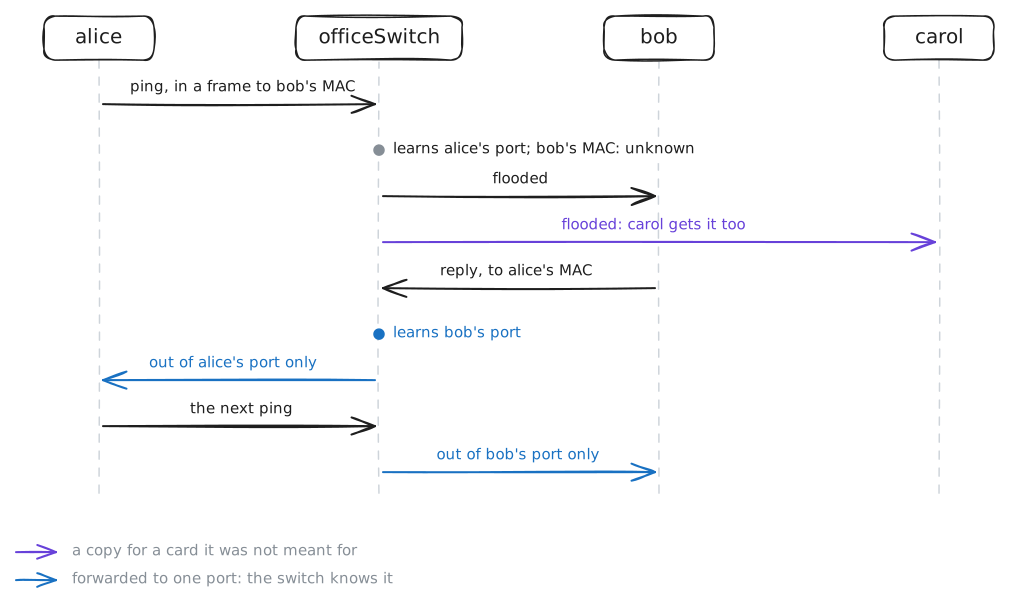
Alice, bob and carol each have one cable to officeSwitch, a Switch. You will watch it learn which of its ports each MAC address sits behind, flood what it has not learned yet, forget, and fill up.
Steps
-
A switch is ports and a table
Each cable ends in one port of officeSwitch, named after the device at the other end. List them first: everything the switch learns, it files by port.
officeSwitch:~# bridge link show
officeSwitch:~# ip -br addr show master br0
-
Learning from source addresses
The switch's table starts empty. Alice pings bob; then list what the switch learned, since that table is how it later sends a frame to one port instead of all.
alice:~# ping -c1 -W2 10.0.1.11
officeSwitch:~# bridge fdb show br br0 dynamic
-
Unknown destination: flood it
The table is emptied again. Alice pings bob three times while carol records every ping that reaches her card, to see what a switch does with a frame it cannot place yet.
alice:~# ping -c3 10.0.1.11
-
Aging: forgetting who went quiet
Devices unplug and move, so the switch forgets an entry that stays quiet for its aging time, 20 seconds here; else it would keep sending to a port nobody is behind. Read the table with its timers.
officeSwitch:~# bridge -s fdb show br br0 dynamic
officeSwitch:~# bridge -s fdb show br br0 dynamic
-
A full table turns the switch into a hub
This switch's table holds 16 entries, and anyone plugged in can fill it. Read the switch's counter, then ping bob from alice while carol records, to see what a switch does when it cannot learn.
officeSwitch:~# ip -d link show br0
alice:~# ping -c3 10.0.1.11
alice:~# ping -c3 10.0.1.11
-
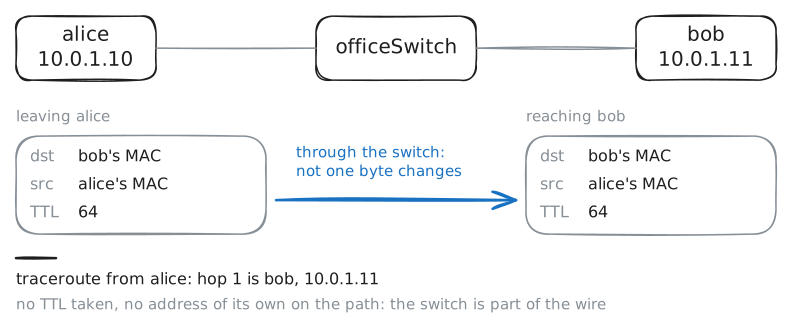
A switch is not a hop
A Router is a hop on the way: it lowers the TTL and answers for it. Trace the way from alice to bob, to see whether the switch takes part in IP at all.
alice:~# traceroute -n 10.0.1.11