 Hack the Route Start free Open app
 The idea
Access control lists are ordered lists of permit and deny lines a Router reads, top to bottom, for every packet crossing one of its cards. You write them on edgeRouter, which joins the office (admin and staff), the guest network and webServer, as rules in iptables.
Steps
-
No list, no limits
Before taking anything away, see what crosses freely, so each later line shows exactly what it stops. The office, the guests and the web server each have a network; edgeRouter joins them and holds no list yet.
staff:~# nc -zv -w 2 10.0.2.10 22
-
A standard ACL near the source
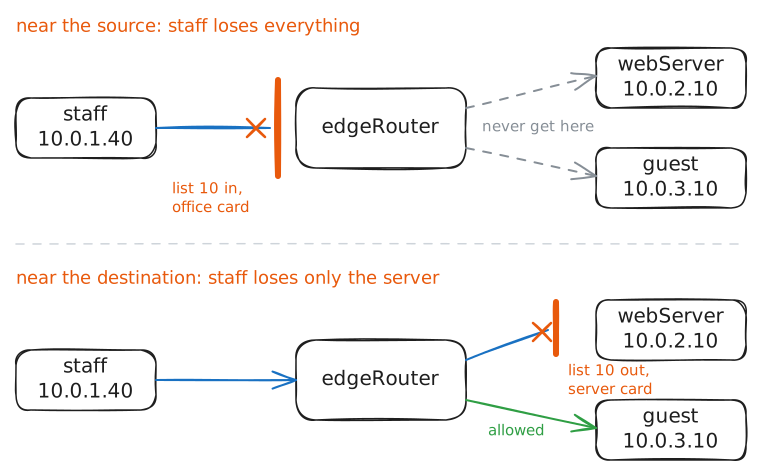
Keep staff (10.0.1.40) off the server. The simplest list names only who sent a packet, so it is quick to write and cheap to check. A standard list names only a source: "deny 10.0.1.40", checked in on the office card. The router's list is iptables'
FORWARDchain.edgeRouter:~# iptables -A FORWARD -i officeNetwork -s 10.0.1.40 -j DROP staff:~# ping -c 2 -W 2 10.0.3.10
-
Move it next to the destination
A standard line cannot say where to, so only where it sits can limit its damage. Check the last step's line out on the server card instead, where it only meets packets entering the server network.
edgeRouter:~# iptables -R FORWARD 2 -o serverNetwork -s 10.0.1.40 -j DROP
staff:~# ping -c 2 -W 2 10.0.3.10
staff:~# curl -m 4 http://webServer.lab/
-
An extended ACL near the source
Only the admin (10.0.1.20) may open SSH on the server. Stopping unwanted traffic at the door it comes in by saves every link after it, but needs a line that says where to. An extended list also names the destination, protocol and port, so it can sit near the source.
edgeRouter:~# iptables -A FORWARD -i officeNetwork -p tcp -s 10.0.1.20 -d 10.0.2.10 --dport 22 -j ACCEPT
edgeRouter:~# iptables -A FORWARD -i officeNetwork -p tcp -d 10.0.2.10 --dport 22 -j DROP
staff:~# nc -zv -w 2 10.0.2.10 22
staff:~# curl -s http://webServer.lab/
-
First match wins
Lists grow over years, and a line added in a hurry can hide the careful ones below it. Put a broad "drop all SSH" above the last step's list, as line 1, then read the counters.
edgeRouter:~# iptables -I FORWARD 1 -p tcp --dport 22 -j DROP
admin:~# nc -zv -w 2 10.0.2.10 22
edgeRouter:~# iptables -L FORWARD -v -n --line-numbers
edgeRouter:~# iptables -D FORWARD 1
admin:~# nc -zv -w 2 10.0.2.10 22
-
Your own list: guests get the web only
Guests are strangers on your network, so they should reach only what they came for. Your list: the guests may reach the web server (10.0.2.10) on port 80, and nothing else on the server network. Done when the guest loads the page, its SSH is blocked and staff still gets in.
edgeRouter:~# iptables -A FORWARD -i guestNetwork -p tcp -d 10.0.2.10 --dport 80 -j ACCEPT
edgeRouter:~# iptables -A FORWARD -i guestNetwork -d 10.0.2.0/24 -j DROP
guest:~# curl -s -m 4 http://webServer.lab/
guest:~# nc -zv -w 2 10.0.2.10 22
staff:~# nc -zv -w 2 10.0.2.10 22