 Hack the Route Start free Open app
 The idea
A laptop and a phone join a home network and ask for their settings; dhcpServer lends them, while the printer's were typed by hand. homeRouter, the router, is their way out to a web server. See how DHCP works, message by message.
Steps
-
An address nobody typed
Typing settings on every device that joins does not scale, so nobody set up this laptop. Read its routing table and DNS server, then the printer's, set by hand.
laptop:~# ip route
laptop:~# cat /etc/resolv.conf
printer:~# ip route
-
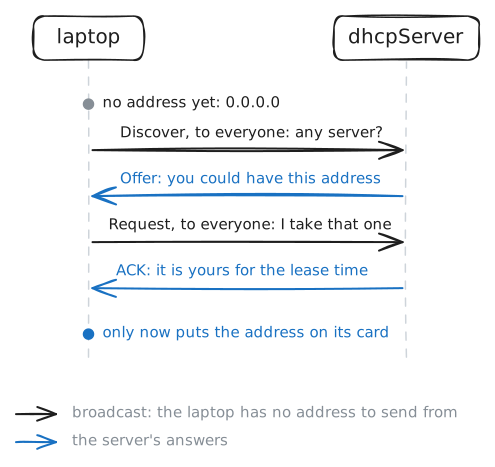
Discover, Offer, Request, ACK
A device with no address cannot be sent anything, so asking for one takes a special exchange. Make the laptop ask again while the server records, and find the four
DHCP-Messagelines.laptop:~# dhcp-renew eth0 laptop:~# ip -4 addr show eth0
-
The server's side
Why
.11again, not any free address? The server decides, so its settings explain it. Print the DHCP server's settings and its lease list, then play a visitor from the printer.dhcpServer:~# cat /etc/dnsmasq.conf dhcpServer:~# cat /var/lib/misc/dnsmasq.leases printer:~# nmap --script broadcast-dhcp-discover -e eth0
-
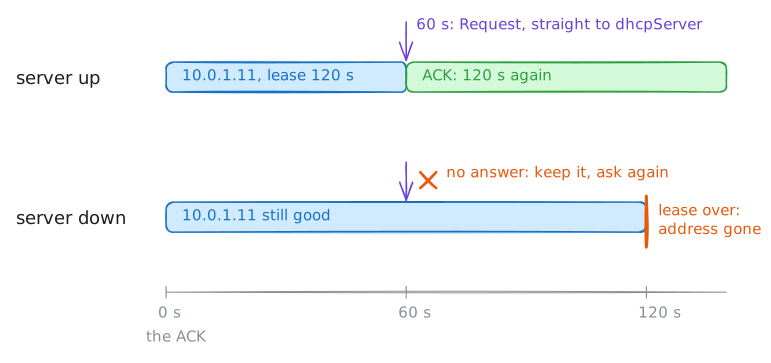
Renewing a lease
An address is only lent, for 120 seconds here, so the laptop must keep renewing it. Renew the lease now, while the server records. Then the server stops: check the address and fetch the page.
laptop:~# dhcp-renew eth0 laptop:~# ip -4 addr show eth0 laptop:~# curl -s --max-time 5 http://webServer.lab/
-
Joining while the server is down
A device that joins during an outage meets the server's silence. The server is still off, and the lab made the laptop leave: now it joins again. Record its card while it asks, then try the page.
laptop:~# dhcp-renew eth0
laptop:~# ip -4 addr show eth0
laptop:~# curl -sS --max-time 5 http://webServer.lab/
-
An address it gives itself
With no answer, a device can still reach its neighbours by giving itself an address from
169.254.0.0/16. Check with ARP that169.254.77.77is free, put it on the card, then read the routing table.laptop:~# arping -D -c 2 -I eth0 169.254.77.77 laptop:~# ip addr add 169.254.77.77/16 dev eth0 laptop:~# ip route
-
The server comes back
Outages end, and a network should heal without anyone touching each device. The DHCP server starts again; nobody touches the laptop: wait for its address, then fetch the page.
laptop:~# ip -4 addr show eth0
laptop:~# curl -s --max-time 5 http://webServer.lab/