 Hack the Route Start free Open app
 The idea
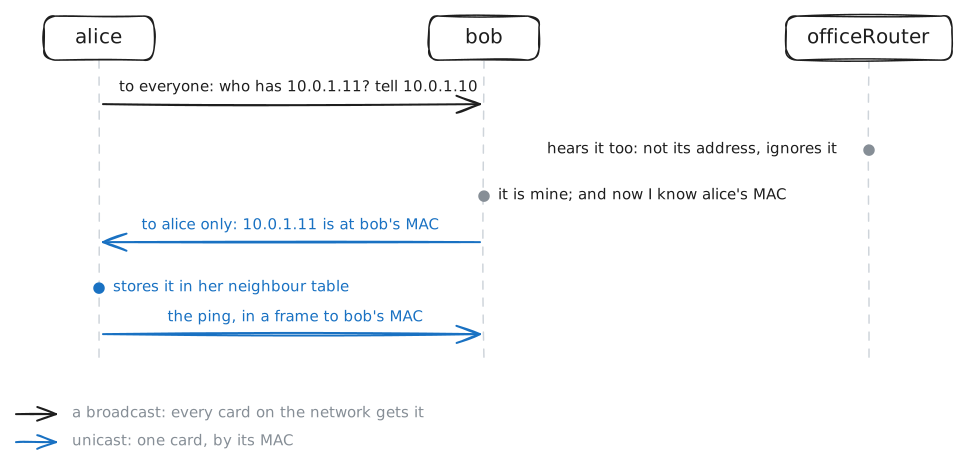
alice and bob share an office network with officeRouter, the router to a file server on another network. On the wire alice's network card needs the other card's MAC address, and ARP finds it: see how ARP works, one frame at a time.
Steps
-
Two addresses on one card
alice already has an IP address, yet the cable between cards needs a different kind of address to deliver anything. Look at alice's network card,
eth0, and find the line that starts withlink/ether.alice:~# ip link show eth0
-
Asking the network
Alice knows bob's IP address,
10.0.1.11, but not his MAC, and without it she cannot address a frame to him. Ping him once while her card is recorded, and watch how she finds out.alice:~# ping -c1 -W2 10.0.1.11 alice:~# ip neigh show 10.0.1.11 bob:~# ip neigh show 10.0.1.10
-
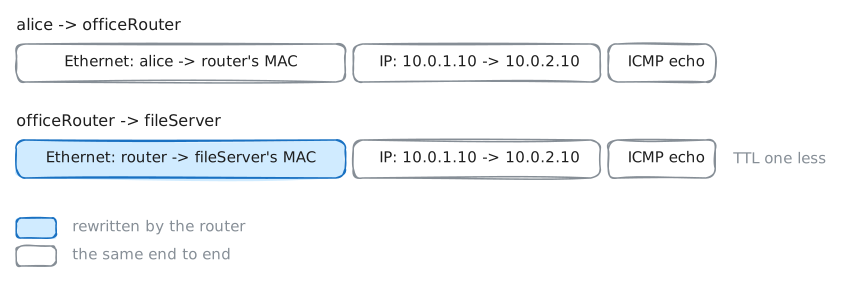
Beyond the network
The file server,
10.0.2.10, is behind the router10.0.1.2, out of reach of alice's broadcasts. So whose MAC does she need? Ping it once while alice's card is recorded.alice:~# ping -c1 -W2 10.0.2.10 alice:~# ip neigh
-
Hop by hop
The router has a card on each network, and a frame never crosses it: only the packet inside does. Send the same ping, recorded on both cards, and compare the two
echo requestlines.alice:~# ping -c1 -W2 10.0.2.10 officeRouter:~# ip neigh
-
Nobody home
10.0.1.99is on alice's network, but no device has it. A ping that cannot leave fails differently from one that gets no reply, so learn this symptom. Ping it while her card is recorded.alice:~# ping -c3 10.0.1.99 alice:~# ip neigh show 10.0.1.99
-
Absent, or just silent?
Silence to a ping does not prove a host is absent. With bob dropping every ping, ping him, read alice's entry for him, then ask the ARP question alone.
alice:~# ping -c2 -W1 10.0.1.11
alice:~# ip neigh show 10.0.1.11
alice:~# arping -c2 -I eth0 10.0.1.11
-
Is this address free?
Two cards with one address break each other at random, so a device checks before taking one.
arping -Dasks from0.0.0.0, "I have none yet": an answer means it is taken. See it on bob's address, then check10.0.1.50yourself.alice:~# arping -D -c2 -w3 -I eth0 10.0.1.11 alice:~# arping -D -c2 -w3 -I eth0 10.0.1.50