 Hack the Route Start free Open app
 The idea
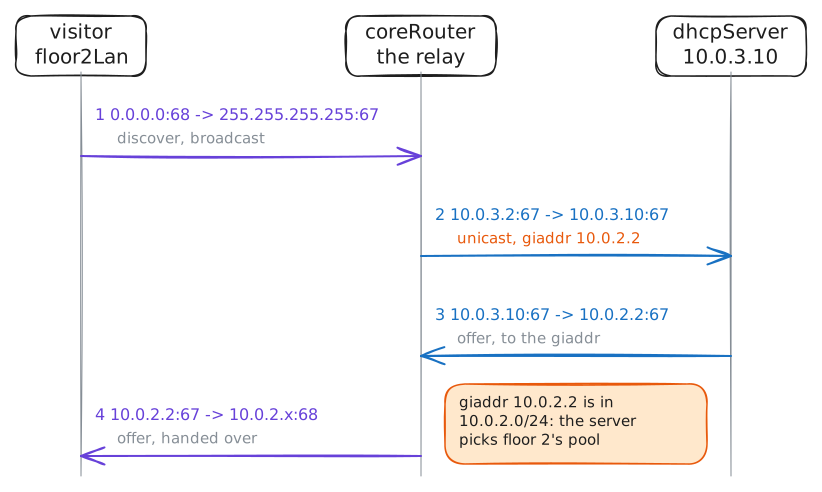
A laptop on floor 1, a phone and a visitor on floor 2, and one DHCP server in the server room: coreRouter, the router between them, is a DHCP relay. See the visitor's broadcast stop at the router, then cross.
Steps
-
One server for three networks
One server for every floor is cheaper and simpler than one per floor, but it must hear each floor's devices. The laptop and the phone asked DHCP for an address when the lab started. See what they got, then the address of the lab's only DHCP server.
laptop:~# ip route
phone:~# ip route
dhcpServer:~# ip -br -4 addr
-
Broadcasts stop at the router
To see why a relay is needed, take it away. With coreRouter's relay stopped, the visitor on floor 2 asks for an address while coreRouter records DHCP on all its cards.
visitor:~# udhcpc -i eth0 -n -q -t 4
Pro
3 more steps in the app
- The relay at work
- The server picks the pool by giaddr
- Option 82