 Hack the Route Start free Open app
 The idea
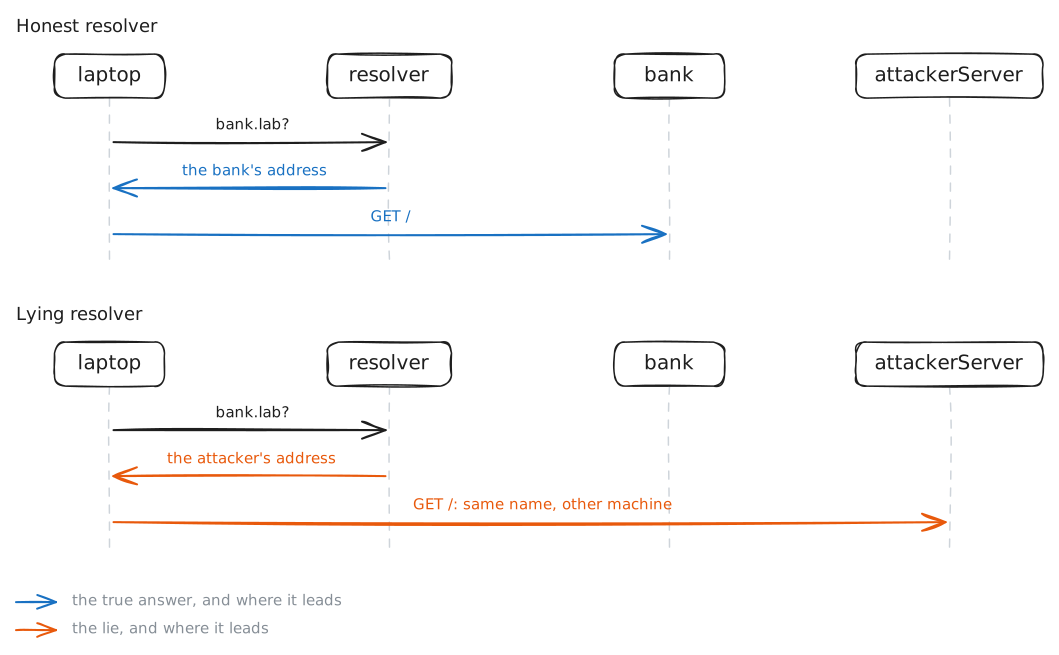
Programs connect to addresses, not names, so the laptop asks a resolver for the bank's address and trusts the answer completely. dns spoofing is a lie in that answer: the same name, the same command, a different machine. A certificate is what notices.
Steps
-
Ask the question yourself
Do by hand what every program does for you: ask DNS for the bank's address, and watch the question cross the wire. The laptop has one resolver, the
SERVERline names it, and the lookup is one plain packet each way with nothing to prove the answer is genuine.laptop:~# cat /etc/resolv.conf laptop:~# dig bank.lab
-
Visit the bank and remember its certificate
Over HTTPS a server proves who it is with a certificate: a signed statement that it is
bank.lab, backed by a secret key only the real bank holds. Visit the bank, keep a copy of that certificate, and confirm a visit that trusts only it succeeds.laptop:~# curl -s http://bank.lab laptop:~# openssl x509 -in /root/bank.pem -noout -subject laptop:~# curl -s --cacert /root/bank.pem -o /dev/null -w '%{http_code}\n' https://bank.lab
Pro
3 more steps in the app
- Lie about the bank's address
- HTTPS notices
- Get past the lie