 Hack the Route Start free Open app
 The idea
On hotel or café Wi-Fi the way out runs through machines you do not control — an on-path attacker can sit there: plain HTTP is readable and changeable, HTTPS warns instead, and the warning is the thing protecting you.
Steps
-
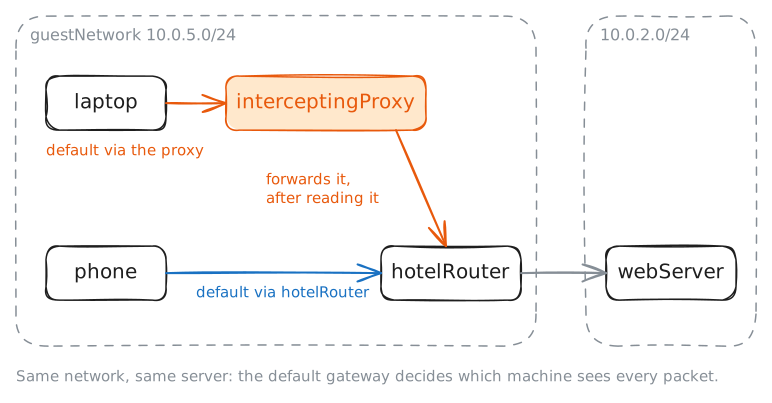
Two devices, two paths
The
laptopand thephoneshare one Wi-Fi, but not one first hop. Find each device's gateway, then trace the path to the same web server. Whoever runs your first hop sees everything you send off the network.laptop:~# ip route laptop:~# traceroute -q3 -w2 webServer.lab phone:~# traceroute -q3 -w2 webServer.lab
-
Plain HTTP is readable
Plain HTTP sends the whole request as readable text. Both devices "log in" over HTTP while the proxy records port 80. The password is in the clear for whoever carries it — but only the laptop's path crosses the proxy.
laptop:~# curl -sS -d 'user=guest&password=hunter2' http://webServer.lab/login -o /dev/null -w '%{http_code}\n'
phone:~# curl -sS -d 'user=you&password=correcthorse' http://webServer.lab/login -o /dev/null -w '%{http_code}\n'
Pro
4 more steps in the app
- The attacker changes the page
- HTTPS notices
- Clicking through the warning
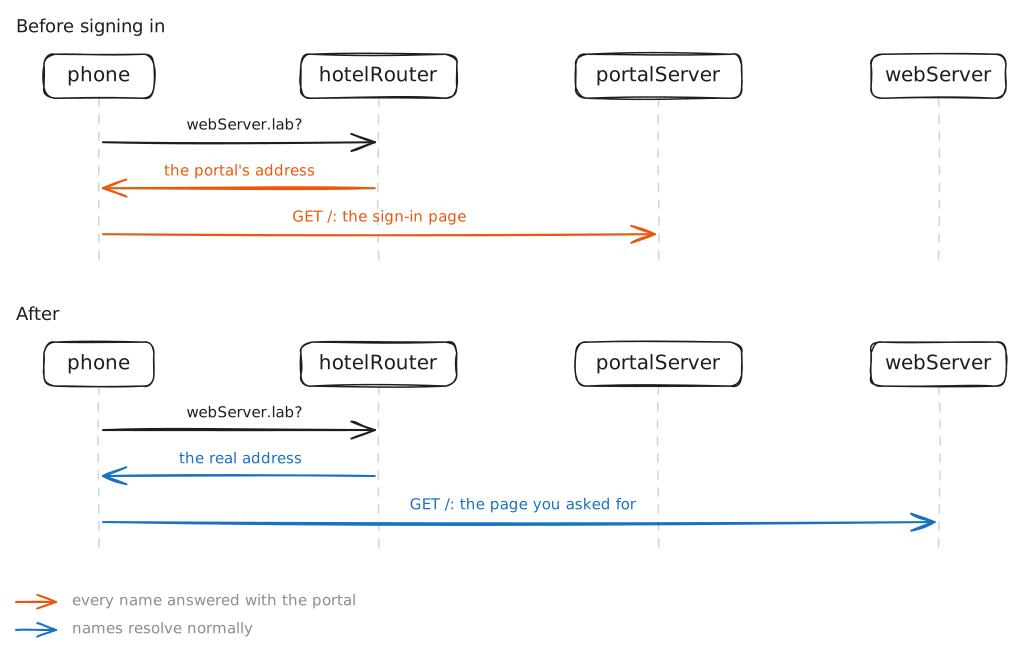
- Before you sign in