 Hack the Route Start free Open app
 The idea
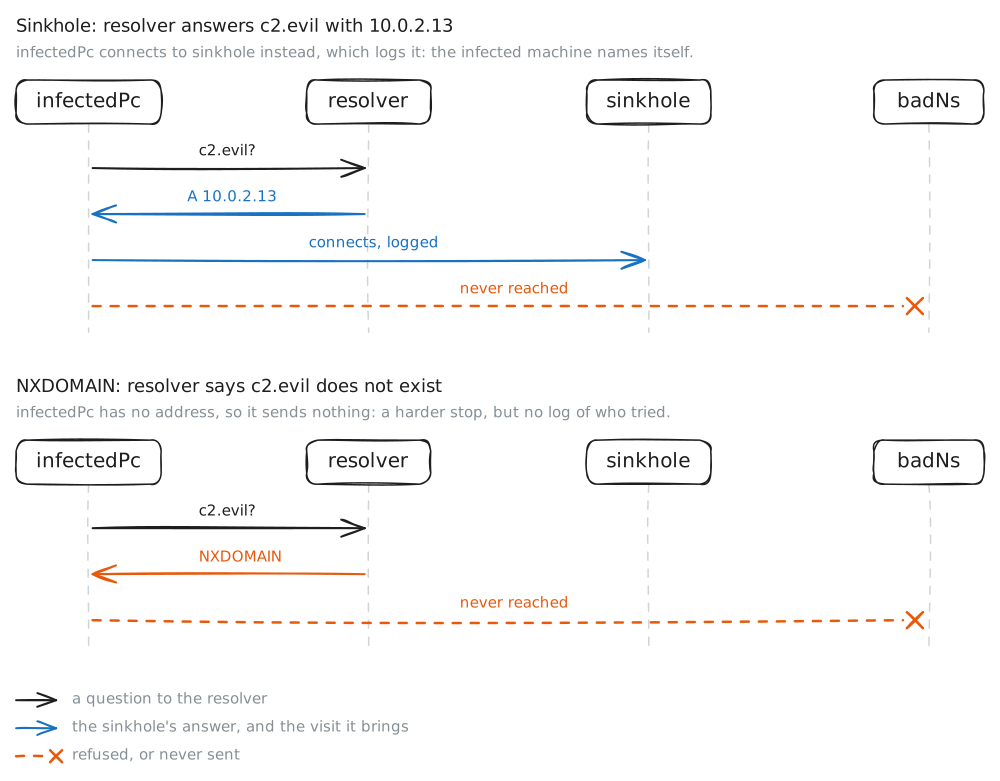
A DNS sinkhole makes the one resolver every machine trusts answer a known-bad domain with a dead end, blocking it for the whole network at once and naming which machine asked. Here infectedPc and cleanPc share the company resolver, badNs serves the malware's domain, and the sinkhole server catches what the block sends its way.
Steps
-
One resolver for every client
Both PCs point at the same DNS server, the company resolver at
10.0.1.12, in/etc/resolv.conf. Every name they look up passes through this one box, so whatever it decides, including what to block, lands on the whole network at once.infectedPc:~# cat /etc/resolv.conf infectedPc:~# dig +short www.site cleanPc:~# dig +short www.site
-
An infected host phones home, and the log names it
infectedPc runs malware that calls home to its command-and-control (C2) domain,
c2.evil. The resolver does not block it yet: the name resolves and the beacon lands. But it logs every query, and that log is how you find which machine is infected.infectedPc:~# dig +short c2.evil infectedPc:~# curl -sS -m3 http://c2.evil/ resolver:~# grep c2.evil /var/log/unbound.log
Pro
3 more steps in the app
- Block it for everyone: the sinkhole
- The sinkhole logs who arrives
- A hard block: NXDOMAIN