 Hack the Route Start free Open app
 The idea
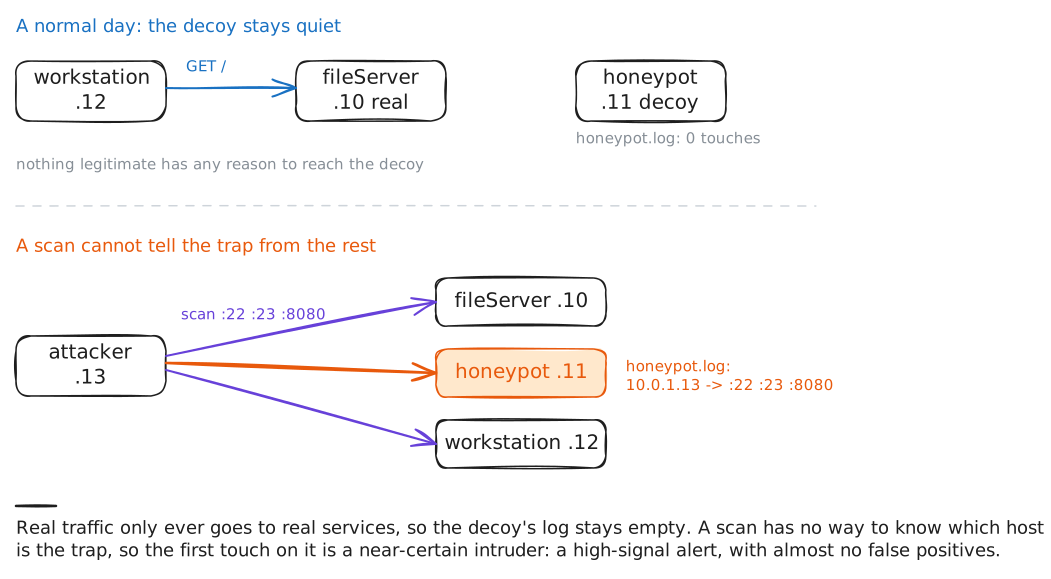
A honeypot is a decoy host with no job and no real user, so any connection to it is a high-confidence alert. On one office network the honeypot opens three tempting ports and logs every touch, the workstation does honest work with fileServer, and the attacker scans the office and steps on the trap.
Steps
-
A decoy with no purpose
The honeypot listens on three ports a snooper loves: 22 (SSH), 23 (telnet) and 8080 (a web admin panel). None of them serves anyone; they exist only to be touched. Check the decoy is up and its log is empty first, because every line that appears later is a lead.
honeypot:~# ss -tln honeypot:~# awk '/accepting connection/ {n++} END {print (n + 0) " touches logged"}' /var/log/honeypot.log -
A normal day, no alerts
The workstation does its real work: it fetches a page from fileServer. Honest traffic has no reason to reach a decoy, so the honeypot should stay untouched. That is why its alerts are worth reading: there are no false positives to wade through.
workstation:~# curl -sS http://fileServer.lab/ honeypot:~# awk '/accepting connection/ {n++} END {print (n + 0) " touches logged"}' /var/log/honeypot.log -
A scan trips it
An intruder's first move after getting in is to map the network: a port scan knocks on every address's ports to see which are open. The scan cannot know which host is the trap, so it connects to the decoy like any other host, and the moment it does, the honeypot logs the touch.
attacker:~# nmap -Pn -sT -p 22,23,8080 10.0.1.10-13
honeypot:~# grep 'accepting connection' /var/log/honeypot.log
-
Read the alert
A deliberate connection lands in the same log: the attacker telnets to the old-looking login prompt. Read the newest line yourself, because each line is a complete alert: a time, the source address to chase, and which decoy service drew them. There is nothing to tune and no normal traffic to compare against.
attacker:~# nc -w2 10.0.1.11 23
honeypot:~# grep 'accepting connection' /var/log/honeypot.log
-
Blind the decoy, then restore
A honeypot only logs what reaches it, so anything in front of it can blind it. The lab has put a firewall rule on the honeypot that drops everything arriving on port 8080: a scan of 8080 now leaves no trace. Confirm it, delete the rule, and watch the decoy answer again.
attacker:~# nc -v -w2 10.0.1.11 8080
honeypot:~# iptables -D INPUT -p tcp --dport 8080 -j DROP
attacker:~# nc -w2 10.0.1.11 8080