 Hack the Route Start free Open app
 The idea
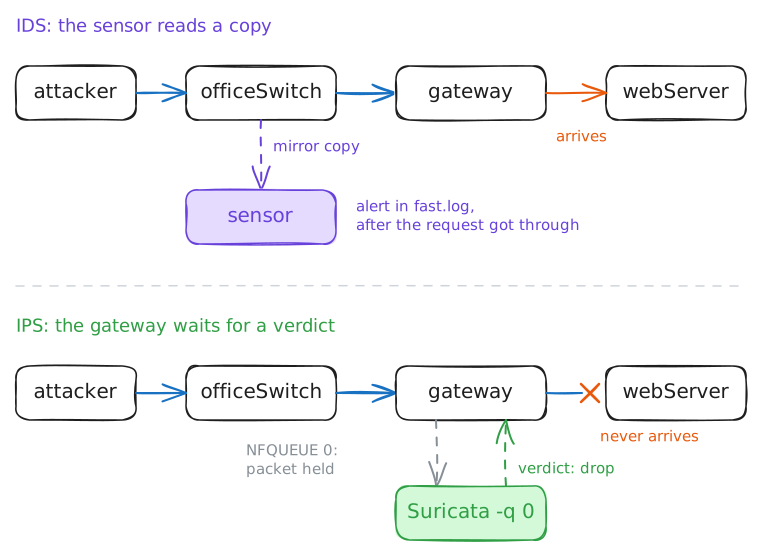
An IDS/IPS reads the content of traffic and matches it against known-bad patterns, its signatures: beside the path it only raises an alert, on the path it can drop the packet. Here officeSwitch copies the gateway's traffic to the sensor, the attacker probes webServer among the laptop's ordinary requests, and then the gateway itself runs Suricata inline.
Steps
-
A mirror port: a copy of every frame
A sensor can only watch traffic that reaches its card. officeSwitch is set to mirror the gateway's port: it copies every frame in and out of it to the sensor's port, and still forwards the original unchanged. That is how the sensor sees both halves of a conversation it is not part of.
officeSwitch:~# tc filter show dev gateway ingress
laptop:~# curl -sS http://10.0.2.10/
-
A signature, and Suricata listening on the copy
A signature reads like a sentence: an action (
alert), a protocol (http), from → to, then options — herecontent:"passwd", fire when a request's URL containspasswd.sidnumbers the rule,revits version. Real sensors load tens of thousands from feeds; here you load one, so every alert is yours.sensor:~# cat /etc/suricata/rules/local.rules sensor:~# suricata -c /etc/suricata/netlab.yaml --af-packet=eth0 -D -l /var/log/suricata sensor:~# grep -E 'rules successfully loaded|Engine started' /var/log/suricata/suricata.log
Pro
4 more steps in the app
- The attack is seen, not stopped
- A false positive, and tuning the signature
- Inline: the gateway drops the attack
- Fail open: when the IPS stops