 Hack the Route Start free Open app
 The idea
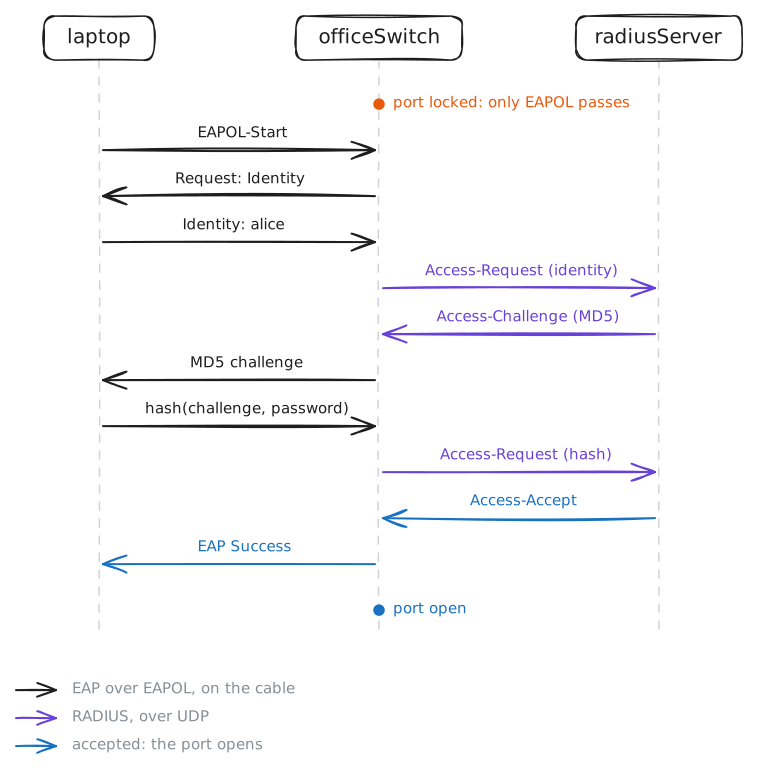
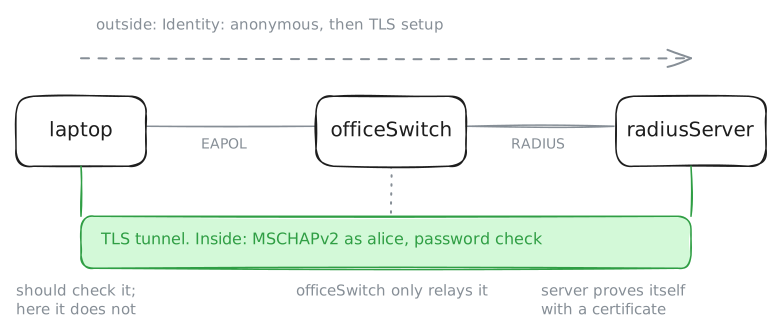
802.1X keeps a switch port shut until the device on it logs in. The laptop logs in on officeSwitch, which asks radiusServer over RADIUS; the port opens to fileServer. An intruder who guesses alice's password stays out.
Steps
-
A locked port passes nothing
A free wall jack must not be a way in, so the laptop's port starts shut. Ping fileServer from the laptop, then read the port's settings and its MAC table on officeSwitch.
laptop:~# ping -c2 -W1 10.0.1.12
officeSwitch:~# bridge -d link show dev laptop
officeSwitch:~# bridge fdb show dev laptop
-
Log in on the port with 802.1X
The laptop is the supplicant, the device that wants in; it speaks EAP to the switch in EAPOL frames. Start
wpa_supplicantwith the settings in/etc/wpa_supplicant/office.conf(alice's account, EAP-MD5), read its status, and ping again.laptop:~# wpa_supplicant -B -D wired -i eth0 -c /etc/wpa_supplicant/office.conf laptop:~# wpa_cli -i eth0 status laptop:~# ping -c2 -W1 10.0.1.12
Pro
4 more steps in the app
- What the switch did
- A wrong password: Access-Reject
- EAP methods: MD5 shows too much
- Log off, and the port locks again