 Hack the Route Start free Open app
 The idea
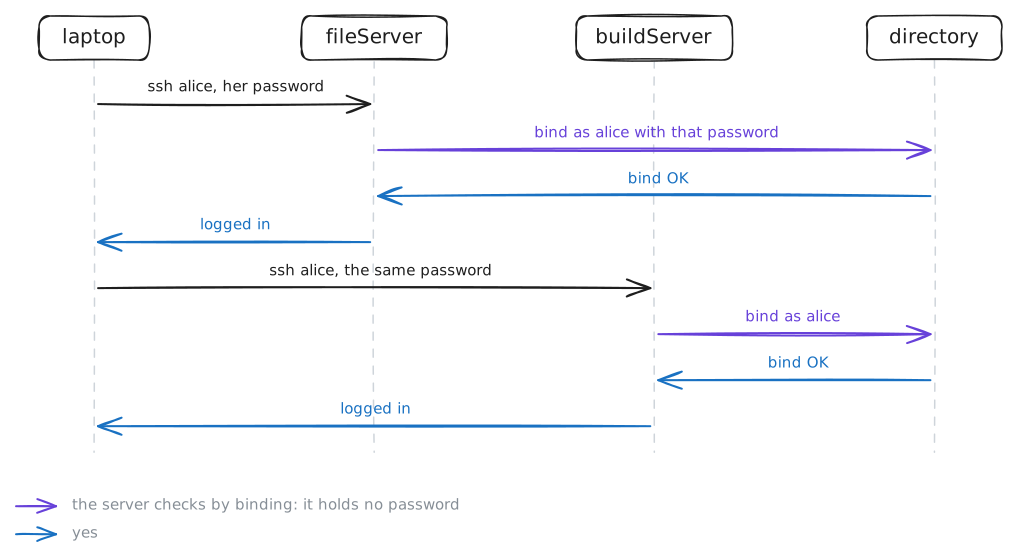
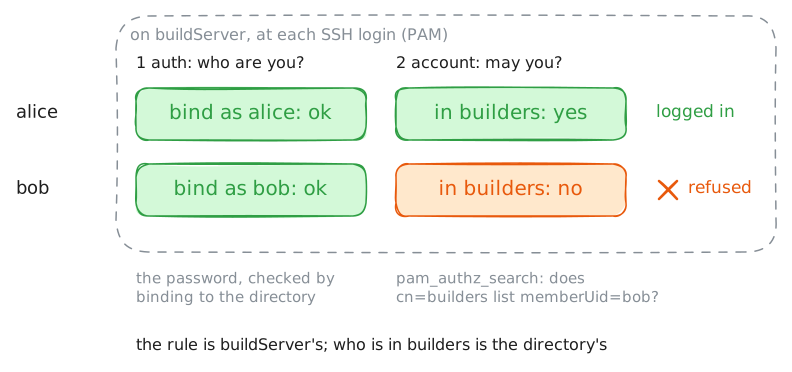
A directory keeps a company's people and groups in one place, and every server asks it at each login. Here directory holds alice, bob and carol; fileServer lets in any of them, buildServer only the builders group. From the laptop, one change in the directory reaches both servers at once: a group, a password, a person.
Steps
-
One account, every server
Every entry in the directory has a DN that spells its place in the tree from the leaf up:
uid=alice,ou=people,dc=office,dc=lab. A search takes a base, where to start, and a filter with the operator first:(&(objectClass=posixGroup)(memberUid=alice))asks for the groups that name alice. Search for them, then log in to buildServer as alice over SSH.laptop:~# ldapsearch -x -LLL -H ldap://directory.lab -b ou=groups,dc=office,dc=lab '(&(objectClass=posixGroup)(memberUid=alice))' cn laptop:~# sshpass -p correct-horse ssh alice@buildServer.lab id
-
A bind proves who you are
To act as someone, a client binds: it sends a DN and a password, and the directory checks them. Without a bind, you are anonymous. Then access control says who reads what:
userPasswordserves anonymous only to bind with, and only its owner may read it. Bind as alice, then read heruserPasswordbound as her.laptop:~# ldapwhoami -x -H ldap://directory.lab -D uid=alice,ou=people,dc=office,dc=lab -w correct-horse laptop:~# ldapwhoami -x -H ldap://directory.lab -D uid=alice,ou=people,dc=office,dc=lab -w letmein laptop:~# ldapsearch -x -LLL -H ldap://directory.lab -b uid=alice,ou=people,dc=office,dc=lab -s base userPassword laptop:~# ldapsearch -x -LLL -H ldap://directory.lab -D uid=alice,ou=people,dc=office,dc=lab -w correct-horse -b uid=alice,ou=people,dc=office,dc=lab -s base userPassword
Pro
4 more steps in the app
- A group decides who gets in
- Change a password once
- Remove a person, and every door closes
- What a simple bind puts on the wire