 Hack the Route Start free Open app
 The idea
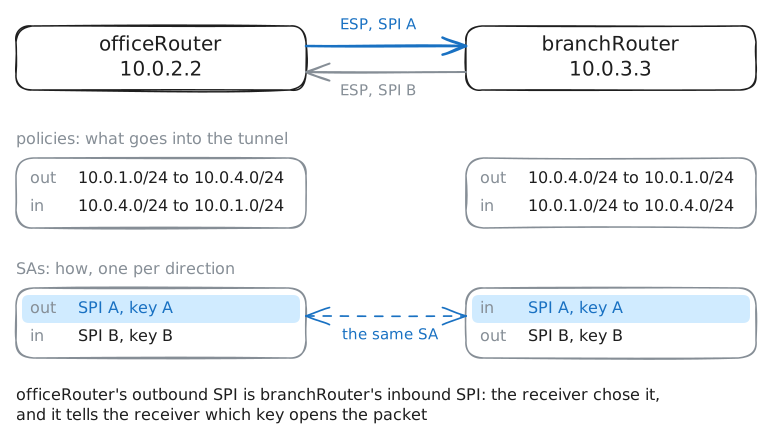
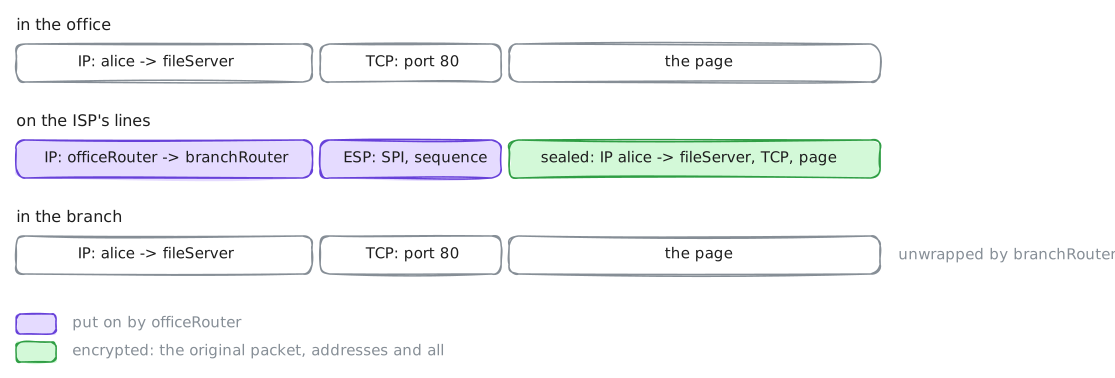
IPsec has two routers agree on keys (IKE) and then encrypt whatever their policy selects (ESP), so the ISP between two offices sees only sealed packets: a site to site tunnel. officeRouter and branchRouter build it across ispRouter, so alice in the office reaches fileServer in the branch.
Steps
-
Without the tunnel: the ISP reads everything
Before sealing anything, see what an ISP in the middle can read without it. alice, in the office, and fileServer, in the branch, are joined across an ISP, with no tunnel yet.
ispRouterrecords what passes.alice:~# curl -s http://fileServer.lab/payroll.csv
-
IKE: the routers agree on keys
Before encrypting anything, the two routers must share keys, over the very line the ISP listens on. IKE (Internet Key Exchange) does it.
swanctldrives strongSwan, the IPsec program on both routers.officeRouter:~# swanctl --initiate --child sites officeRouter:~# swanctl --list-sas
Pro
4 more steps in the app
- Policies and SAs in the kernel
- What the ISP sees now
- The price: bigger packets, a smaller MTU
- Both ends must agree