 Hack the Route Start free Open app
 The idea
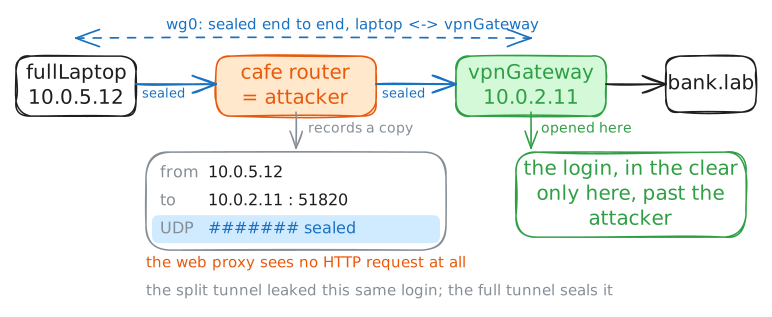
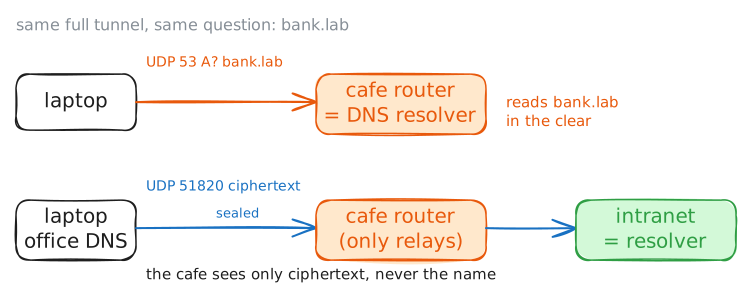
A VPN gives a laptop on a hostile network an encrypted tunnel to a server it trusts: what you route into it is hidden, the rest is not. In a café whose gateway, attackerProxy, records everything, splitLaptop and fullLaptop tunnel to vpnGateway, the office's one door; the phone has no VPN.
Steps
-
The office has no door but the VPN
A VPN only matters if the office cannot be reached without it, so check that first. The office's intranet sits on a network nobody routes to.
phone, in the café, has no VPN.phone:~# ping -c 1 -W 2 intranet.lab
-
A split tunnel reaches the office
A tunnel that carries only the office's traffic leaves the rest as it was: cheap, but not private.
splitLaptopruns a VPN: WireGuard, built into Linux, with a tunnel card namedwg0. A split tunnel sends only some destinations into it. Its routing table says which.splitLaptop:~# ip route splitLaptop:~# curl -s -m 10 http://intranet.lab/ splitLaptop:~# traceroute -q1 -w2 intranet.lab
Pro
5 more steps in the app
- What the VPN server sees
- A split tunnel leaves everything else exposed
- A full tunnel gives the attacker only noise
- The DNS leak
- When the VPN server goes away