 Hack the Route Start free Open app
 The idea
A laptop asks frontDoor, one address in front of three web servers, webA, webB and webC. The load balancer picks a server for each request and stops sending to the dead.
Steps
-
One address, three servers
One server can only take so many users, so busy sites put several behind one address. frontDoor,
10.0.1.10, is a load balancer in front of three web servers, its backends. Each one answers with its name. Send six requests to the one address.laptop:~# curl -s --max-time 3 'http://10.0.1.10:80/#[1-6]'
-
Round robin vs least connections
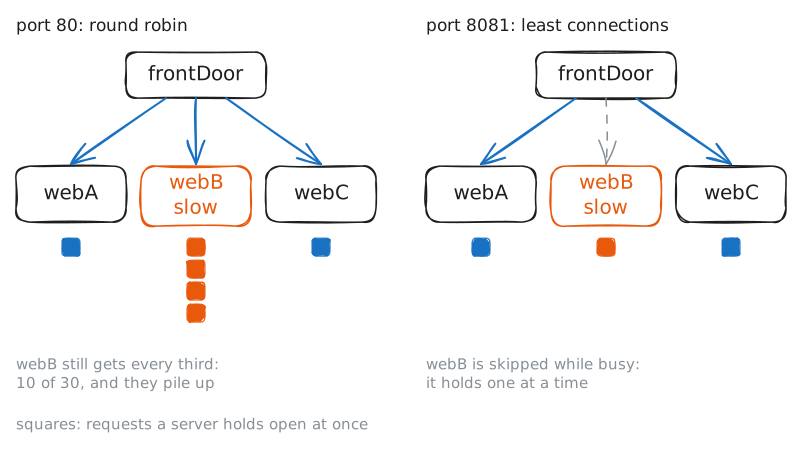
Taking turns is fair only while every server is as fast as the others. webB is now slow. Send 30 overlapping requests to Port 80 (round robin), then to port 8081, which picks the one with the fewest open connections.
laptop:~# h2load --h1 -n 30 -c 30 -r 1 --rate-period 50ms http://10.0.1.10:80/
laptop:~# h2load --h1 -n 30 -c 30 -r 1 --rate-period 50ms http://10.0.1.10:8081/
Pro
4 more steps in the app
- Two connections, or one passed through
- Health checks
- Running, but not healthy
- Draining a server for maintenance