 Hack the Route Start free Open app
 The idea
A laptop sends data to a data server through an office Router and a slow WAN line. How fast that path is depends on its bandwidth, its round trip, TCP's window and loss.
Steps
-
Measure the path: round-trip time and throughput
Every later number in this lab is set by these two, so measure them first. Time a trip to the data server and back, then send as much as the WAN line carries.
laptop:~# ping -c 5 10.0.2.10
laptop:~# iperf3 -c 10.0.2.10 -t 4
-
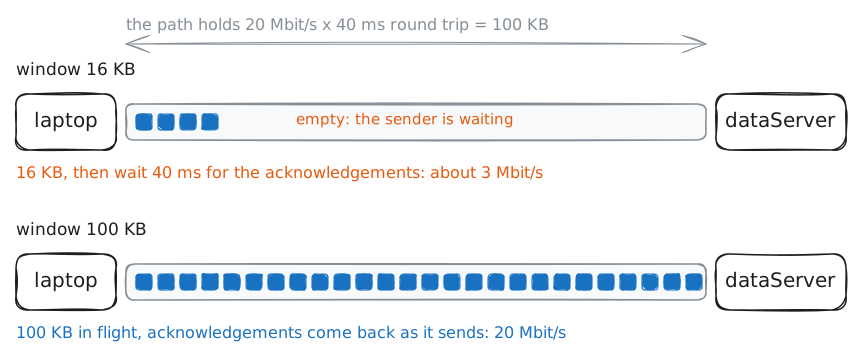
The window: bandwidth × delay
A fast line can still be slow to use, because the sender stops to wait. TCP sends a limited amount, its window, then waits a round trip for the answers. Shrink it to 16 KB.
laptop:~# iperf3 -c 10.0.2.10 -t 4 -w 16K
laptop:~# iperf3 -c 10.0.2.10 -t 4 -w 128K
-
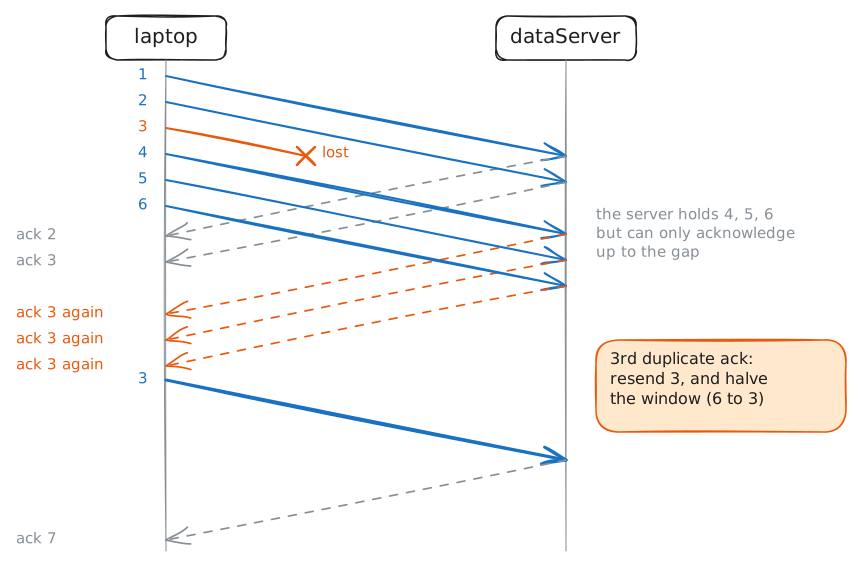
Loss: TCP slows down, and resends
Real lines drop packets now and then, and TCP's answer to that costs far more than the drops. The WAN line now has packet loss. Measure TCP over it and find the column that shows it.
laptop:~# iperf3 -c 10.0.2.10 -t 5 -f m
-
The same loss over UDP: fast, and gone
Calls and video cannot wait for a resend, so they pick a protocol that never does. Send UDP over the same lossy line at a steady 5 Mbit/s. UDP has no window and no acknowledgements.
laptop:~# iperf3 -c 10.0.2.10 -u -b 5M -t 5