 Hack the Route Start free Open app
 The idea
A laptop reaches a file server through two routers joined by a smaller link. Every link has a largest packet; a packet too big is split, or refused with a message that keeps TCP working.
Steps
-
Every link has an MTU
Every size limit in this lab starts on one link, so find the laptop's own first. Its link carries packets of up to 1500 bytes. Send officeRouter the biggest ping that fits, unsplit.
laptop:~# ping -M do -c 1 -s 1472 10.0.1.2
laptop:~# ping -M do -c 1 -s 1473 10.0.1.2
-
Too big for the next link: fragmentation
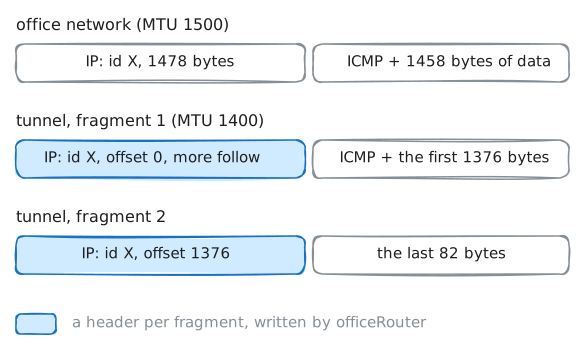
Networks mix link sizes, so a router must handle a packet too big for its next link. A smaller link lies between the routers. Read its MTU, then ping the file server with 1450 bytes, splitting allowed. The server records.
officeRouter:~# ip link show tunnelNetwork
laptop:~# ping -M dont -c 1 -s 1450 10.0.3.10
Pro
4 more steps in the app
- Don't Fragment: path MTU discovery
- TCP: the MSS, and discovery doing its job
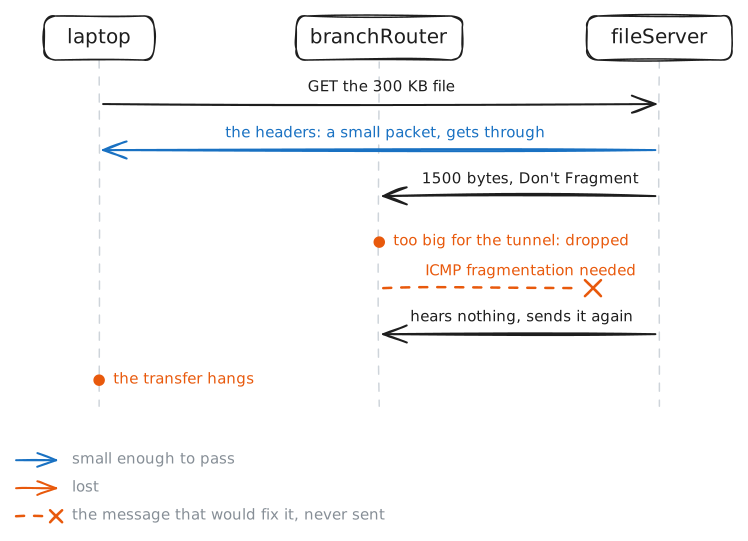
- The black hole: when the message never arrives
- The fix: MSS clamping