 Hack the Route Start free Open app
 The idea
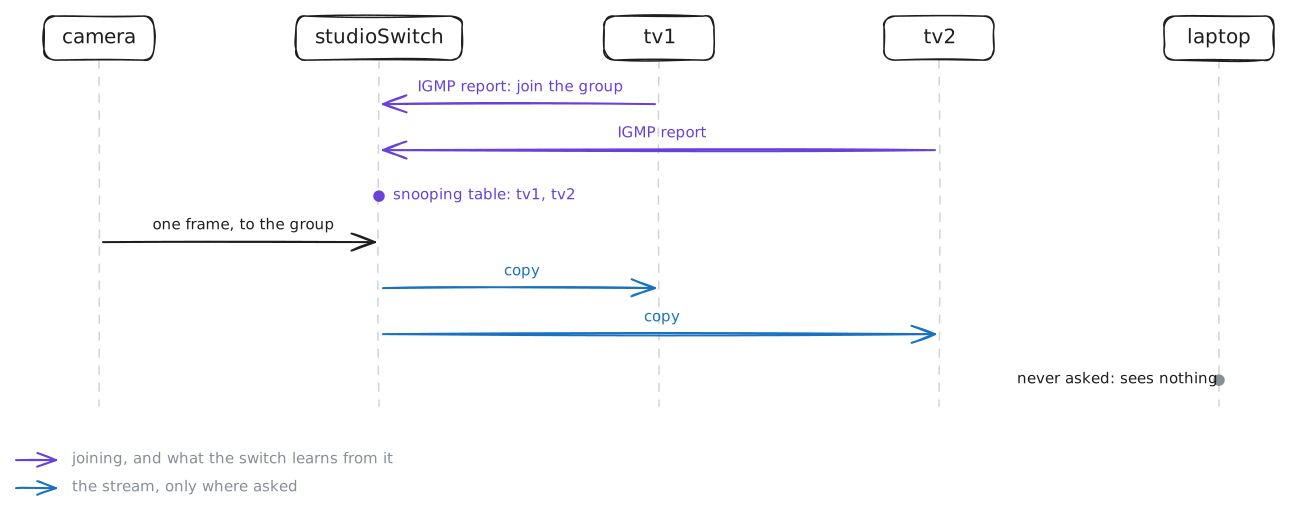
A studio camera streams video to a group; tv1 and tv2 want it, the laptop does not, and all hang off studioSwitch, a Switch. desk sits behind officeRouter, a Router. The stream reaches only the devices that joined, and the switch learns them by reading their joins.
Steps
-
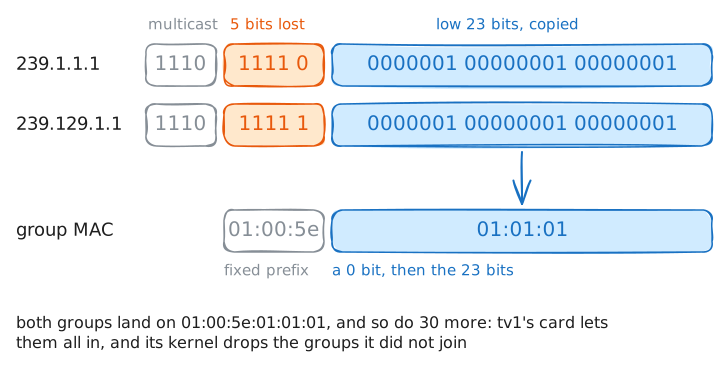
A group address, a group MAC
The camera streams to the group
239.1.1.1, one address for every viewer. tv1 joins it; list the groups on its card, to see what joining changes.tv1:~# ip addr add 239.1.1.1/32 dev eth0 autojoin tv1:~# ip maddr show dev eth0
-
Joining: IGMP reports and the switch's table
The switch must learn which ports want the group, or it would send the stream everywhere. Join tv2 too, while studioSwitch records its port to tv2; then read the switch's table of groups.
tv2:~# ip addr add 239.1.1.1/32 dev eth0 autojoin
studioSwitch:~# bridge mdb show
Pro
4 more steps in the app
- One stream, only to those who asked
- The querier keeps the table fresh
- Unknown groups, and a switch that does not snoop
- A router is where the group ends