 Hack the Route Start free Open app
 The idea
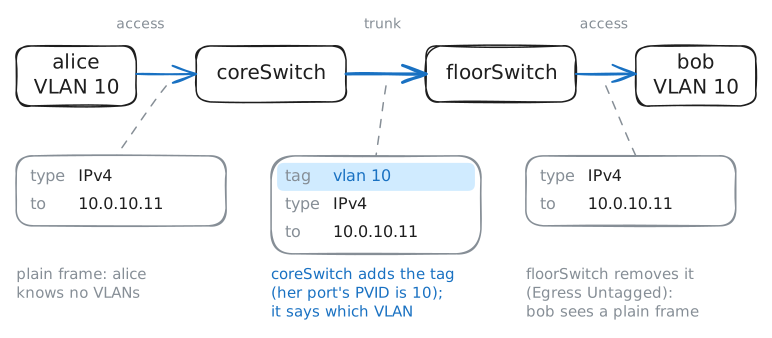
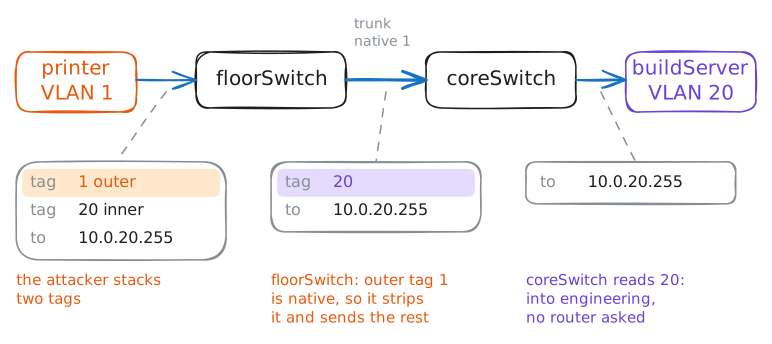
alice and a build server on coreSwitch, bob, carol, a desk phone and a printer on floorSwitch: two switches joined by one cable, a trunk. It carries many VLANs, each frame with its tag; one VLAN, the native, goes untagged.
Steps
-
Access ports: the switch does the tagging
bob is in sales, VLAN 10, on floorSwitch. List floorSwitch's ports (named after their devices) and their VLANs, then bob's card, to find out who does the tagging.
floorSwitch:~# bridge vlan show
bob:~# ip -br -4 addr show eth0
bob:~# ping -c1 -W2 10.0.10.2
-
One trunk, many VLANs
alice, also in sales, is on coreSwitch, so sales spans two switches and one cable. Read that cable's VLANs, then ping bob from alice while it is recorded.
floorSwitch:~# bridge vlan show dev coreSwitch
alice:~# ping -c1 -W2 10.0.10.11
Pro
4 more steps in the app
- VLAN 1 and the native VLAN
- A voice VLAN on a desk port
- Allowed VLANs on the trunk
- Routing between VLANs on the switch