 Hack the Route Start free Open app
 The idea
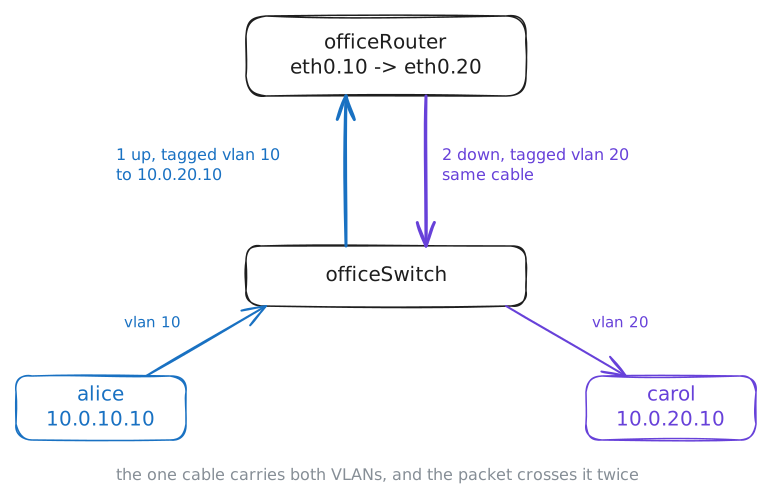
alice and bob in sales, carol and a build server in engineering, all plug into one Switch, officeSwitch. VLANs split it into networks that cannot hear each other; officeRouter, a Router, joins them on purpose.
Steps
-
A card for each VLAN
Here the split lives on the devices' cards, so read alice's card, then the router's.
alice:~# ip -d link show eth0.10
alice:~# ip -br -4 addr show
officeRouter:~# ip -br -4 addr show
-
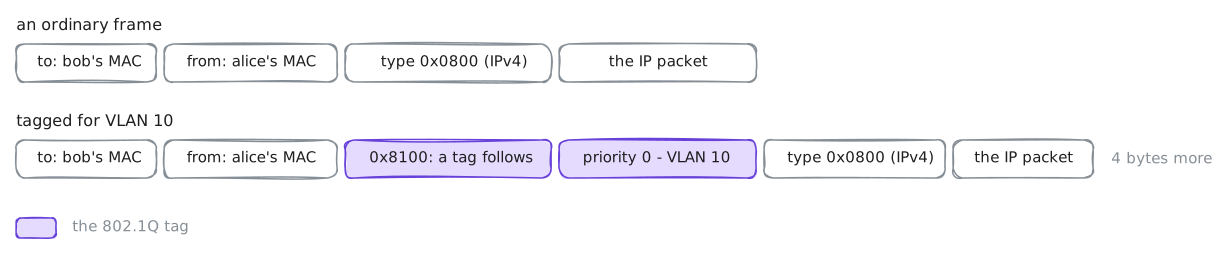
The tag inside the frame
Alice pings bob, in her VLAN, starting with an ARP broadcast. Alice, and carol (VLAN 20) on her cable and on her VLAN card, record it, to find where the tag sits and who hears it.
alice:~# ping -c1 -W2 10.0.10.11
Pro
3 more steps in the app
- Between VLANs: the router on a stick
- The router decides who crosses
- A PC in the wrong VLAN