 Hack the Route Start free Open app
 The idea
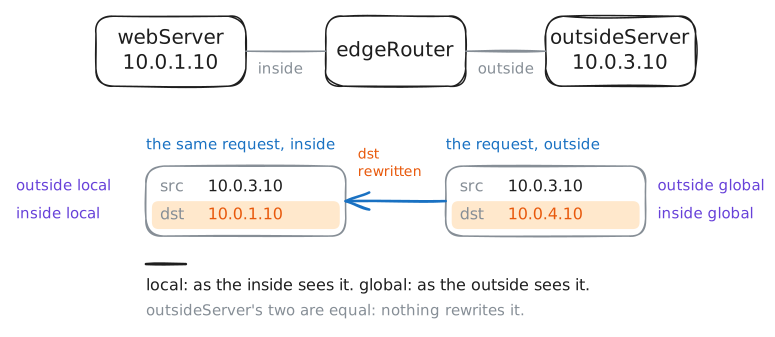
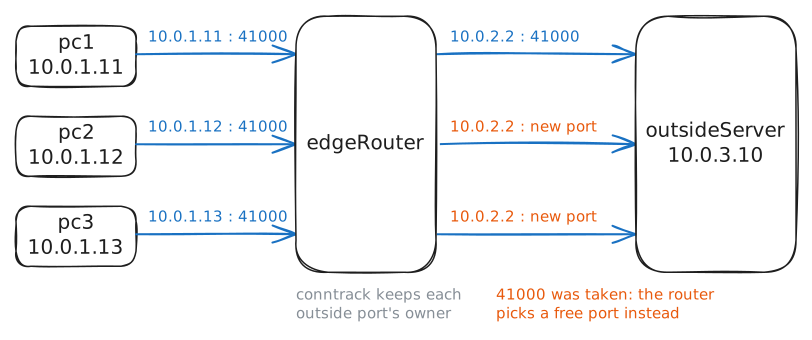
NAT explained: edgeRouter, the company's router, rewrites the inside addresses of a web server and three PCs to outside ones that an outside server sees: one to one for the server, from a pool, or everyone on one address told apart by port.
Steps
-
Static NAT for the web server
The ISP's routes lead to the company's block
10.0.4.0/24, never to its private10.0.1.0/24. The web server (10.0.1.10) gets10.0.4.10for good: a server needs one fixed outside address, or nobody outside could find it.edgeRouter:~# iptables -t nat -A POSTROUTING -s 10.0.1.10 -j SNAT --to-source 10.0.4.10 webServer:~# curl -s -m 3 10.0.3.10 edgeRouter:~# iptables -t nat -A PREROUTING -d 10.0.4.10 -j DNAT --to-destination 10.0.1.10 outsideServer:~# curl -s -m 3 10.0.4.10
-
Four addresses, one conversation
The web server just called out again. edgeRouter keeps each translated connection in its connection tracking table. A reply arrives addressed to
10.0.4.10, so the router needs an entry to turn it back into one for10.0.1.10.edgeRouter:~# conntrack -L -p tcp
Pro
3 more steps in the app
- A pool for the PCs
- Overload: one address for everyone
- Overload does not open the door