 Hack the Route Start free Open app
 The idea
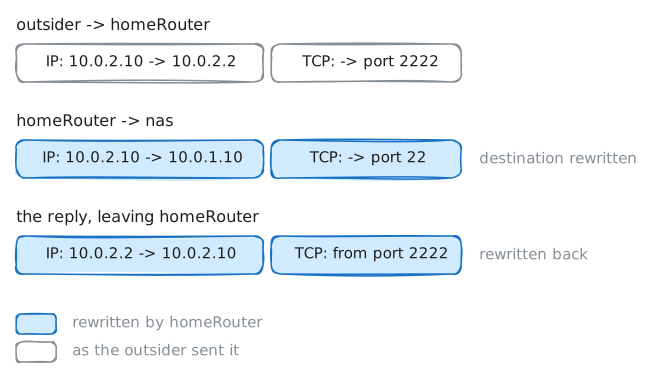
homeRouter hides a house, a laptop and a nas (a storage box), behind one public address, and opens exactly one door inward for the outsider on the internet: port forwarding.
Steps
-
Private addresses stay home
The laptop is
10.0.1.11, inside the house. The outsider is on the internet, where the house shows only the router's10.0.2.2. Try to reach inside from outside first: every later step changes what this attempt runs into.outsider:~# ping -c 2 -W 2 10.0.1.11 outsider:~# curl -sS -m 3 http://10.0.1.10/
-
The house reaches out freely
Now the other way: the laptop pings the outsider, and the outsider records what arrives. A reply can only come back to an address the internet can reach, so watch which source address arrives.
laptop:~# ping -c 2 -W 2 10.0.2.10
-
One door: the SSH forward
SSH opens a shell on another machine and runs a command there. The router passes its own port
2222on to one device inside, so the outsider can reach the NAS without the NAS ever having a public address.outsider:~# ssh -p 2222 admin@10.0.2.2 hostname
-
The forward the firewall still blocks
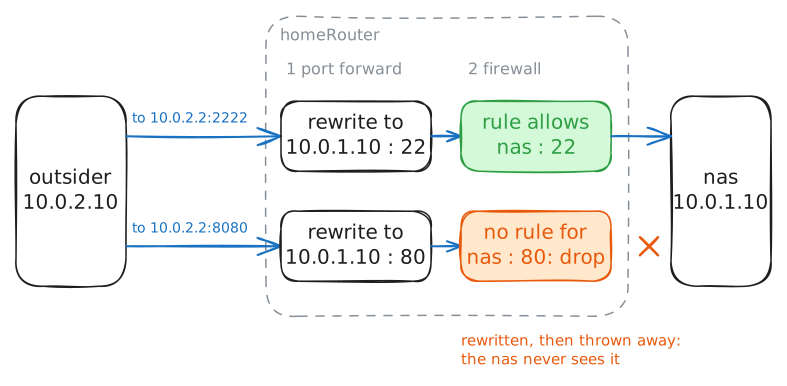
The router also forwards port
8080, to the NAS's web page. Its firewall allows the SSH forward, not this one. Opening a door and letting traffic through it are two separate decisions, and this step shows the second one.outsider:~# curl -sS -m 4 http://10.0.2.2:8080/ laptop:~# curl -s http://nas.lab/
-
The NAS got a new address
The NAS restarted with a new address, as a new DHCP lease would give it. The forward still says
10.0.1.10. Home devices change addresses often, so a forward that silently stops working is a common surprise.outsider:~# ssh -p 2222 admin@10.0.2.2 hostname nas:~# ip -br addr
-
Give the door a fixed address
Make
ssh -p 2222 admin@10.0.2.2 hostnameanswernasfrom outside again, with one change on the NAS. The forward names an address, not a device, so the cheapest fix is to put the NAS back where the forward points. Done when the NAS lists the address the forward expects.nas:~# ip addr replace 10.0.1.10/24 dev homeNetwork outsider:~# ssh -p 2222 admin@10.0.2.2 hostname