 Hack the Route Start free Open app
 The idea
Before any attack comes the quiet part: network reconnaissance — finding which machines are up, which ports answer, and what software sits behind each one, all without logging in to anything. The defence is to shrink what answers.
Steps
-
Which machines are up
You are the attacker on
scanner, with no password to anything. Start wide: a ping sweep asks every address on the server network whether it answers, touching no port. See how much the network gives up for free.scanner:~# nmap -sn 10.0.2.0/24
-
Open and closed ports
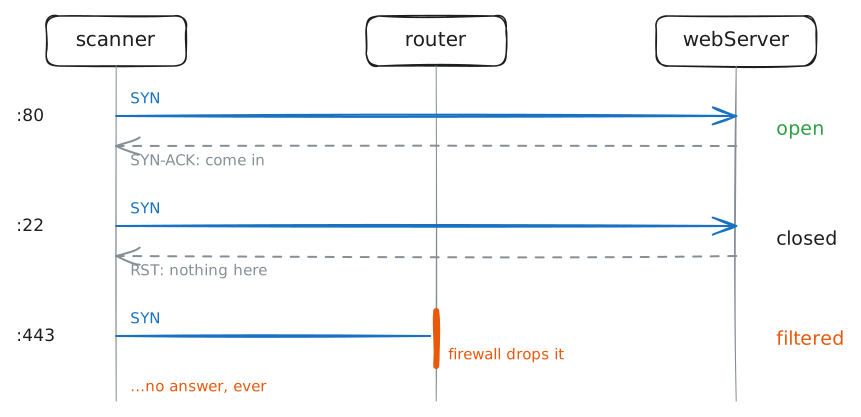
Now knock on each server's doors. Scan the same three ports — 22 (SSH login), 80 (web), 443 (secure web) — on both, and read the state beside each. The states, not a guess, say where each service lives.
scanner:~# nmap -Pn -p 22,80,443 webServer.lab
scanner:~# nmap -Pn -p 22,80,443 appServer.lab
-
Closed is not the same as filtered
The router's firewall now drops every probe to the web server's port 443. Scan the three ports again and watch 443 change. A dropped probe is the quiet tell that a firewall sits in the path.
scanner:~# nmap -Pn -p 22,80,443 webServer.lab
-
What is really running
An open port tells you a door is in use, not what is behind it: nmap names 22 "ssh" from a table, not from what answers. Read the banner — the greeting a service sends — to learn the real software and version.
scanner:~# nc -w2 appServer.lab 22
scanner:~# curl -sI http://webServer.lab/