 Hack the Route Start free Open app
 The idea
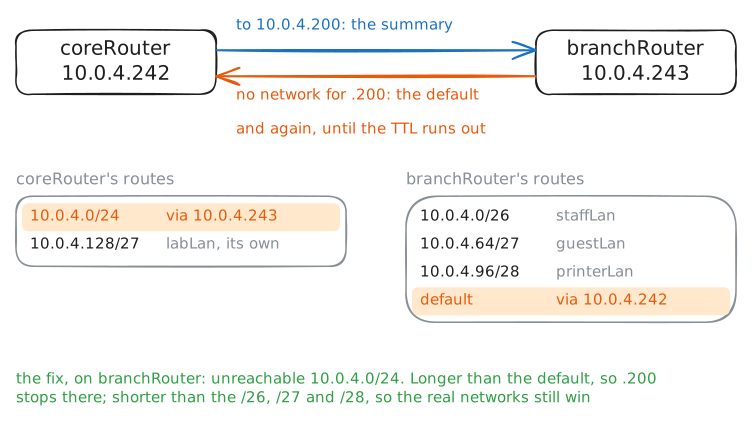
hqLaptop at headquarters reaches a branch's staff, guest and printer subnets through two routers, coreRouter and branchRouter. One route can stand for all of them, if what it covers but does not have is dropped.
Steps
-
A route for every subnet
Every route is a line that each router must store and search, so their number matters. The branch's networks are cut from
10.0.4.0/24(VLSM); coreRouter reaches them through branchRouter,10.0.4.243.coreRouter:~# ip route
-
One summary route
The three share their first 24 bits,
10.0.4, and their next hop, so one route for that block can stand for all. Add it; the lab then removes the three.coreRouter:~# ip route add 10.0.4.0/24 via 10.0.4.243 coreRouter:~# ip route hqLaptop:~# ping -c1 -W1 10.0.4.106
Pro
3 more steps in the app
- The longest prefix wins
- Addresses nobody has
- The null route