 Hack the Route Start free Open app
 The idea
A laptop in an office reaches a web server in a data center through three routers: officeRouter, coreRouter and dataCenterRouter. No router knows the whole path; each knows only the next hop, and that is enough to cross the network, find a broken link and find a slow one.
Steps
-
The laptop only knows one thing
A packet's journey starts with the sender's own choice, so begin at the laptop. The web server is three routers away; read what the laptop's routing table knows about it.
laptop:~# ip route
-
Each router knows one step more
The laptop trusted officeRouter, so the next question is what officeRouter knows. Read its table, then coreRouter's, and follow the data center's network,
10.0.3.0/24.officeRouter:~# ip route coreRouter:~# ip route
-
The way back
A page needs an answer, and the server's reply is a new packet to the laptop, routed again by every router on the way. So each router needs a line back too.
dataCenterRouter:~# ip route
-
Map the path
Reading three tables is slow; one command shows the whole path from the laptop. Count the routers to the web server with
traceroute.laptop:~# traceroute -n webServer.lab
-
How traceroute works
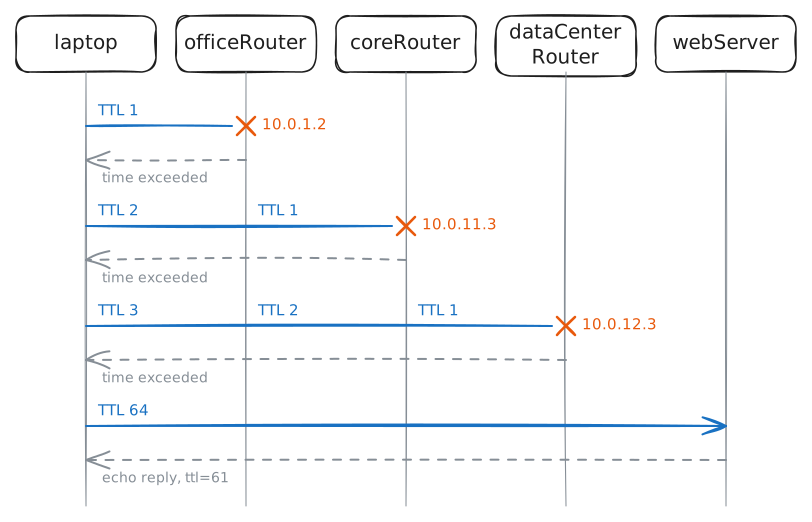
traceroute must make each router show itself, and it uses a counter every packet carries, which each router lowers by one.
ping -t 2starts it at 2.laptop:~# ping -c1 -t 2 webServer.lab laptop:~# ping -c1 -t 3 webServer.lab laptop:~# ping -c1 webServer.lab
-
Break the link in the middle
When a page stops loading, the first question is where the path breaks. The lab cuts the link between coreRouter and dataCenterRouter: find the break; then the link comes back.
laptop:~# ping -c2 -W1 webServer.lab
laptop:~# traceroute -n -m5 webServer.lab
laptop:~# ping -c1 -W2 webServer.lab
-
Make that link a satellite hop
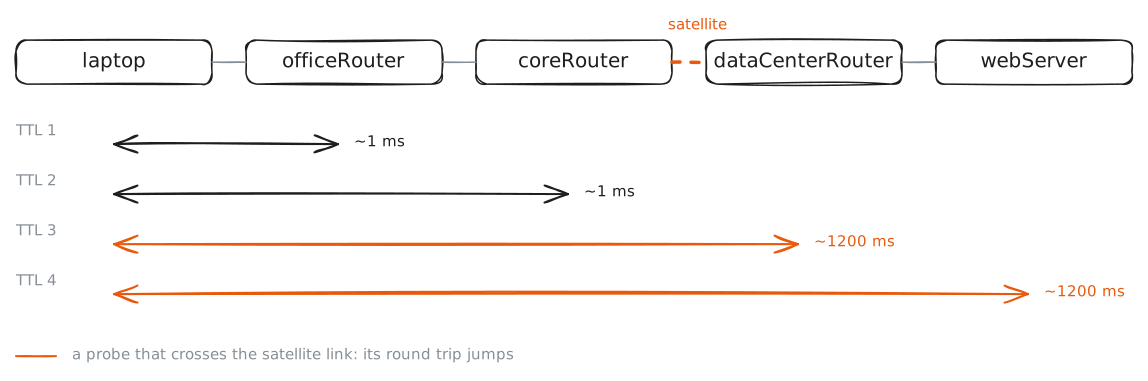
A slow page needs the same hunt: which link adds the time? The lab makes that link a satellite hop, 600 ms each way. Find it from the hop times.
laptop:~# ping -c3 webServer.lab
laptop:~# traceroute -n webServer.lab
laptop:~# ping -c1 webServer.lab