 Hack the Route Start free Open app
 The idea
A laptop behind branchRouter, servers behind hqRouter, two links between the two routers. They know only their own networks until you type their routes: there and back, one address, a backup that floats, and a default.
Steps
-
Only its own networks
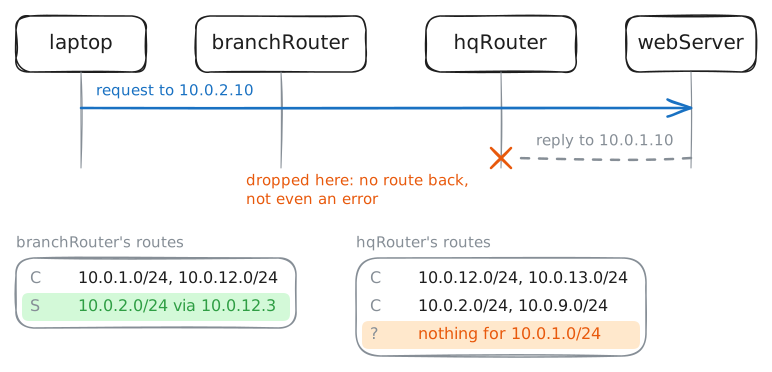
Before typing routes, see what a router does without one. No routes are typed in yet; the laptop pings the web server,
10.0.2.10, behind both routers.branchRouter:~# vtysh -c 'show ip route' laptop:~# ping -c1 -W2 10.0.2.10
-
A route, and the way back
A route typed by hand is a static route: it never changes unless someone edits it. branchRouter gets one:
10.0.2.0/24goes to hqRouter,10.0.12.3, the next hop. hqRouter gets no route back yet.branchRouter:~# vtysh -c 'configure terminal' -c 'ip route 10.0.2.0/24 10.0.12.3' laptop:~# ping -c1 -W2 10.0.2.10 hqRouter:~# vtysh -c 'configure terminal' -c 'ip route 10.0.1.0/24 10.0.12.2' laptop:~# ping -c1 -W2 10.0.2.10
Pro
5 more steps in the app
- The longest match wins
- The floating static
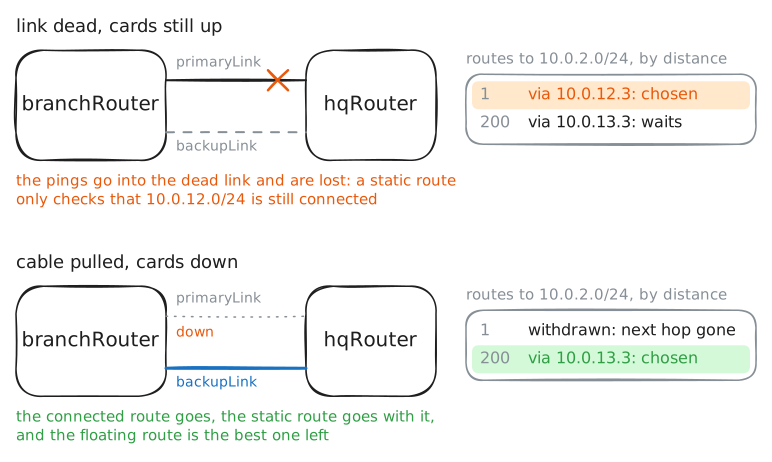
- When the primary fails
- A dead link looks alive
- A default route, far away