 Hack the Route Start learning Open app
The idea
Fern & Pine, an architecture studio, moved into a new office over the weekend: two desks and a file server, one cable each into one Switch. All week something goes wrong in the physical part of the network: the ports and the cables. Learn to read what a port says about itself, and the numbers it keeps.
Steps
-
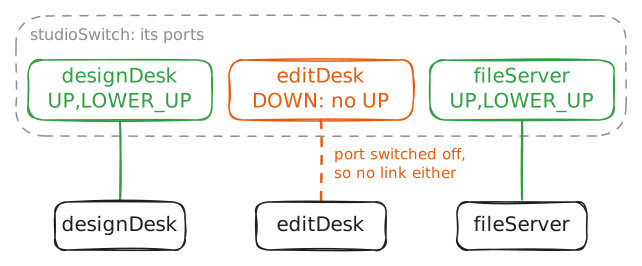
Switched off, or no link
Monday.
editDeskcan't reach anything, and the installer who set upstudioSwitchover the weekend has gone home.Start with the physical part: the ports and the cables. On
studioSwitch, the switch itself is calledbr0. Each of its ports is named after the device at the other end of its cable, so the port callededitDeskis the oneeditDeskplugs into.A switch port, like any network card, has two states that people mix up all the time. Its settings switch it on or off. Separately, it has a live link or it doesn't: a working cable to a working card at the other end.
ip linkshows both, as flags between< >.UPmeans switched on, andLOWER_UPmeans the link is live. A port that's on with no link showsNO-CARRIERin place ofLOWER_UP.editDesk:~# ping -c 3 -W 1 10.0.1.20 studioSwitch:~# ip -br link show master br0 studioSwitch:~# ip link set editDesk up editDesk:~# ping -c 3 -W 1 10.0.1.20
-
Counters only count up
Tuesday, and nothing is broken. That makes it the day to learn what normal looks like, before you need it.
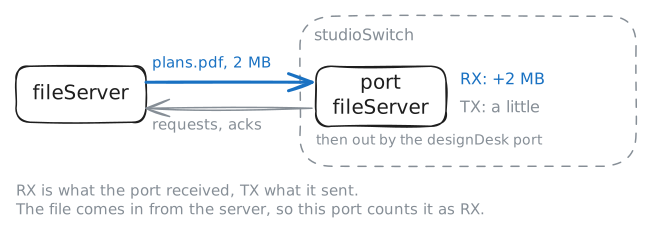
Every card and every switch port keeps counters: frames and bytes received (RX) and sent (TX), and the ones it dropped or found damaged. They start at zero when the card starts and only ever go up.
So one reading tells you little. RX errors 312 could be a broken cable, or one bad minute three weeks ago. Read the counters, let something happen, read them again: the difference is what happened in between.
RX and TX are the port's own point of view. On the switch's port to
fileServer, RX is what the switch received from the server, and TX what it sent to it.Read them while
designDeskdownloads the studio's 2 MB drawing set.studioSwitch:~# ip -s link show fileServer designDesk:~# curl -sS -o /dev/null -m 5 -w "%{size_download} bytes\n" http://10.0.1.20/plans.pdf studioSwitch:~# ip -s link show fileServer -
A cable that damages what it carries
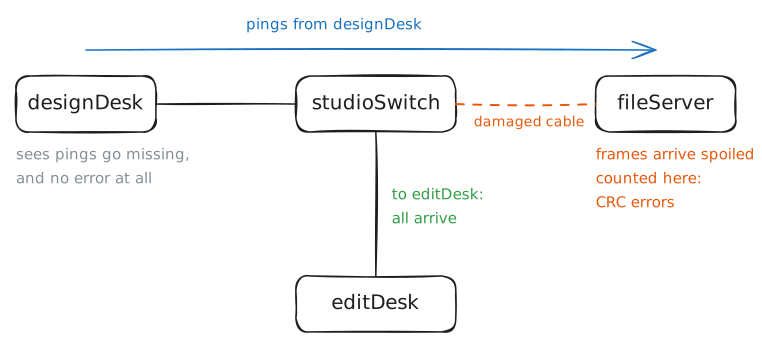
Wednesday. The designers say the file server feels sluggish, and pings to it go missing. Last night the office manager rolled a chair over a cable, and isn't sure which.
On real hardware, every Ethernet frame ends with a check value, computed from every bit in it. The card at the receiving end works it out again. When the two differ, a bit changed on the way: the card throws the frame away and adds one to its CRC errors.
So a damaged cable shows up twice: as packet loss, and as CRC errors on the card at the receiving end of that cable.
This lab's cables are virtual and carry no check value, so a card here can't spot the damage itself. It's caught further up instead: IP, ICMP and TCP carry checksums of their own, and
nstatcounts the packets that fail them.First find which cable. Ping the server, then the other desk, from
designDesk.designDesk:~# ping -c 20 -i 0.2 -s 1000 10.0.1.20 designDesk:~# ping -c 20 -i 0.2 -s 1000 10.0.1.11 fileServer:~# ip -s -s link show eth0 fileServer:~# nstat -az IcmpInCsumErrors TcpInCsumErrors designDesk:~# ping -c 20 -i 0.2 -s 1000 10.0.1.20 fileServer:~# nstat -az IcmpInCsumErrors TcpInCsumErrors
-
Too big for the port
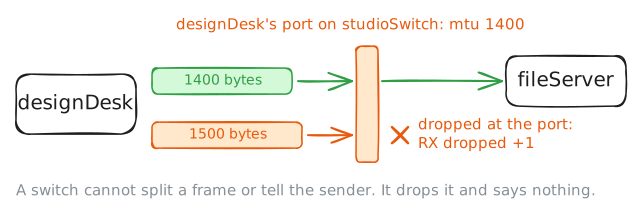
Thursday. Since a contractor's visit last night,
designDeskcan open the studio's file list, butplans.pdfnever arrives.editDeskdownloads the same file in a blink.Every port has an MTU: the biggest packet it carries in one frame, 1500 bytes on ordinary Ethernet. A frame that arrives bigger than a port allows isn't split: a switch can't split frames, and can't tell the sender either. The port drops it, and Cisco counts it as a giant.
Small things fit, so they work: a file list, a ping, a short reply. A download fills every packet to the brim, so it's the thing that breaks. When small works and big stalls, think MTU.
To measure it, send pings of known sizes.
-M doforbids splitting a ping into pieces on the way, and-ssets its size: 1472 bytes of data plus 28 of headers makes a full 1500.designDesk:~# curl -sS -m 5 http://10.0.1.20/ designDesk:~# curl -sS -o /dev/null -m 5 -w "%{size_download} bytes\n" http://10.0.1.20/plans.pdf studioSwitch:~# ip -s link show designDesk designDesk:~# ping -c 2 -W 1 -M do -s 1372 10.0.1.20 designDesk:~# ping -c 2 -W 1 -M do -s 1472 10.0.1.20 studioSwitch:~# ip -s link show designDesk studioSwitch:~# ip link show master br0 studioSwitch:~# ip link set designDesk mtu 1500 designDesk:~# curl -sS -o /dev/null -m 5 -w "%{size_download} bytes\n" http://10.0.1.20/plans.pdf
Run these steps on real machines