 Hack the Route Start learning Open app
The idea
Marek has an authorised engagement against Halcyon Media, a production company, and starts where almost every external test starts: the public DNS. A name server's whole job is to answer questions about a domain, so before Marek touches a single host he asks it the ordinary questions any client may ask (who is authoritative for the name, where its mail goes) and reads the answers for leads.
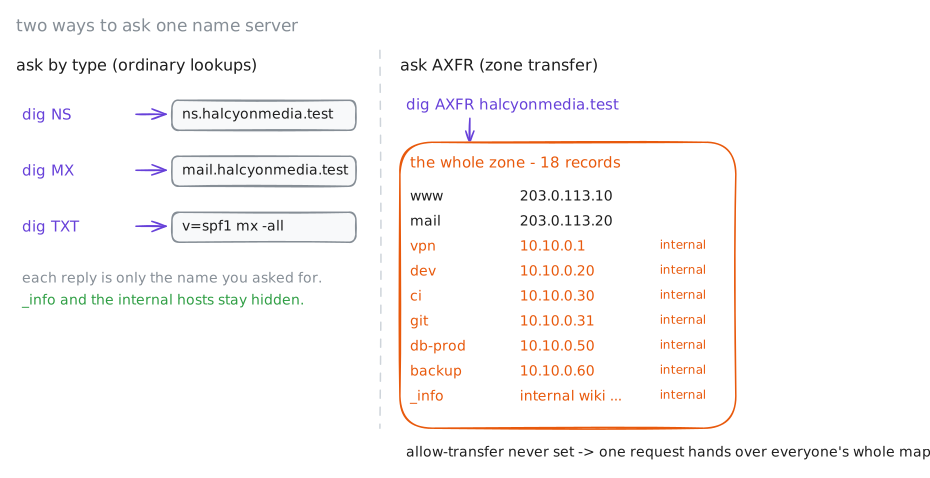
Then he asks the question the server should refuse: hand me the whole zone. Halcyon's name server was never told to say no, so it says yes: every name in halcyonmedia.test, public and internal alike, in one reply. His target is at 10.0.1.53; he names it directly rather than trusting a resolver to chase it.
Steps
-
Ask who answers for the name
DNS is a chain of servers, and footprinting starts by finding the one that speaks for your target: its authoritative name server, the server that holds the real records for
halcyonmedia.testrather than a cached copy. Everything else you ask, you ask it.The
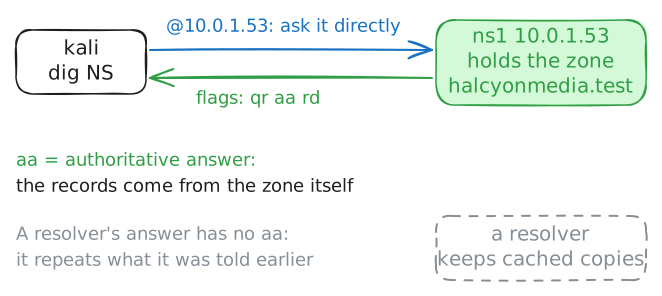
NSrecord names that server. On a real engagement you find it with adig +trace, or by asking the domain's parent (.testhere) for the delegation; Marek was handed one address and confirms it is the right one to ask.digis the standard tool for asking a name server a question:dig NS halcyonmedia.test @10.0.1.53asks the server at10.0.1.53for the zone'sNSrecords. The@names the server to ask; without itdigwould use the box's configured resolver, the server that normally looks names up for it.The reply's header carries flags, and the one to watch is
aa, authoritative answer, set when the server holds the zone itself rather than quoting a cache.kali:~# dig NS halcyonmedia.test @10.0.1.53
-
The records a domain volunteers
Before the big ask, read what the server hands any client that asks politely. Two record types pay off first.
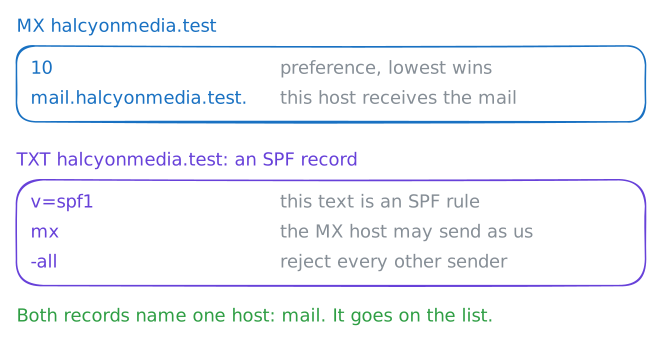
MX(mail exchanger) names the host that receives the domain's email: a real server, usually reachable, and now on your list.TXTrecords hold free-form text: an SPF record says which hosts may send mail as the domain, and operators park all kinds of notes inTXTtoo. Each is a single ordinary lookup, the same kind a mail server or a browser makes a thousand times a day, so nothing here is yet unusual traffic.kali:~# dig MX halcyonmedia.test @10.0.1.53 +noall +answer kali:~# dig TXT halcyonmedia.test @10.0.1.53 +noall +answer
-
Ask for the whole book
A domain's records usually live on more than one name server, so the operator does not edit each by hand. One server is the primary; the others are secondaries that copy the entire zone from it with a single request called a zone transfer (
AXFR). It is a legitimate, necessary mechanism: it is how a backup name server stays in sync.The catch is who may ask. A transfer should go only to the operator's own secondaries, and the
allow-transfersetting is what restricts it. A server that was never given that line falls back to the default in BIND, the name-server software this zone runs on, and answers a transfer request from anyone.So Marek asks:
dig AXFRrequests the full zone, over TCP, from the server.kali:~# dig AXFR halcyonmedia.test @10.0.1.53
-
The tool that does it for you
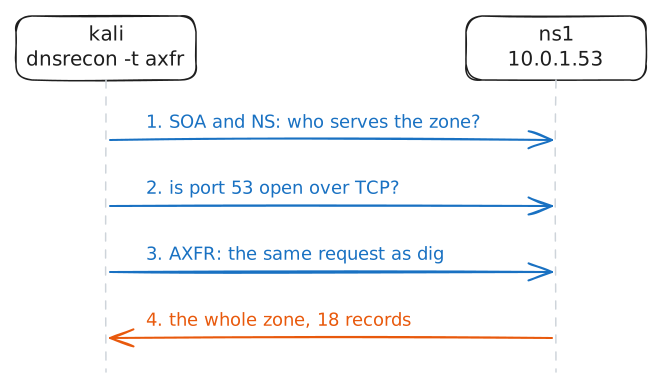
dig AXFRproved the hole by hand. On a real engagement a tester reaches for a tool that does every part and formats the result: find the zone's name servers, try a transfer against each one, and print what comes back.dnsreconis that tool, and it is already on this box.dnsrecon -n 10.0.1.53 -d halcyonmedia.test -t axfr:-dis the domain,-nis the name server to use, and-t axfrselects the zone-transfer test. Run it and read how it narrates the attack.kali:~# dnsrecon -n 10.0.1.53 -d halcyonmedia.test -t axfr
-
Close it, and prove it is closed
Swap seats. You run Halcyon's name server, and Marek's report names the hole: a transfer answered for anyone.
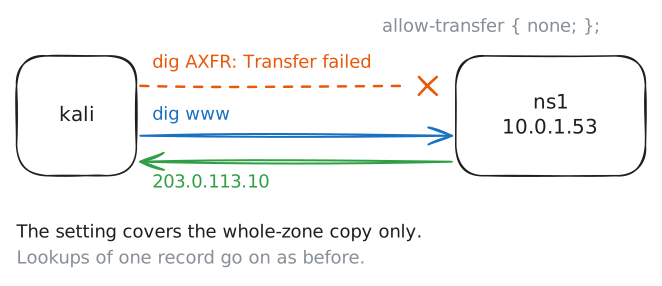
The fix is the line the server never had: tell it who may transfer the zone. With no secondaries that need it, the honest answer is nobody:
allow-transfer { none; };.Add that to the
optionsblock, reload the server, and then check two things: the bulk dump is refused, and ordinary resolution still works for everyone. A lock that breaks the website is no fix.ns1:~# sed -i '/allow-transfer { none; };/d; s/ allow-query { any; };/ allow-query { any; };\n allow-transfer { none; };/' /etc/bind/named.conf ns1:~# named-checkconf ns1:~# rndc reload kali:~# dig AXFR halcyonmedia.test @10.0.1.53 kali:~# dig +short www.halcyonmedia.test @10.0.1.53
Run these steps on real machines
Keep reading
- Cloudflare: What is a DNS zone? article
- dnsrecon (DNS enumeration tool) article
- OWASP WSTG: Information Gathering article