 Hack the Route Start free Open app
 The idea
Run the server that holds a DNS zone, copy it to a second one, and hide lookups
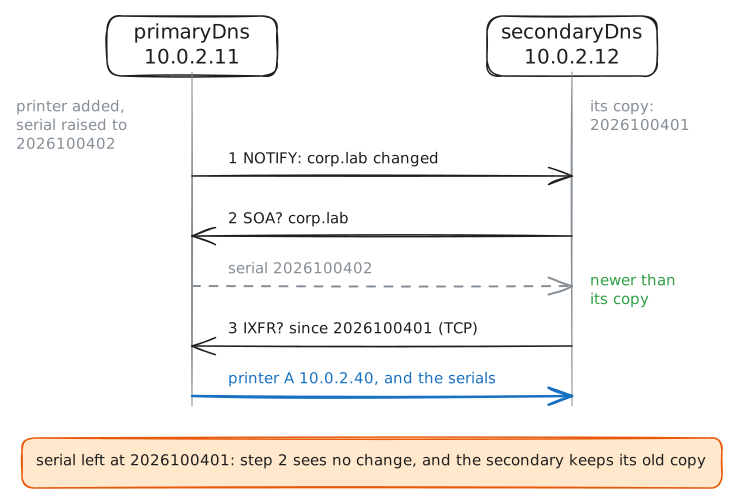
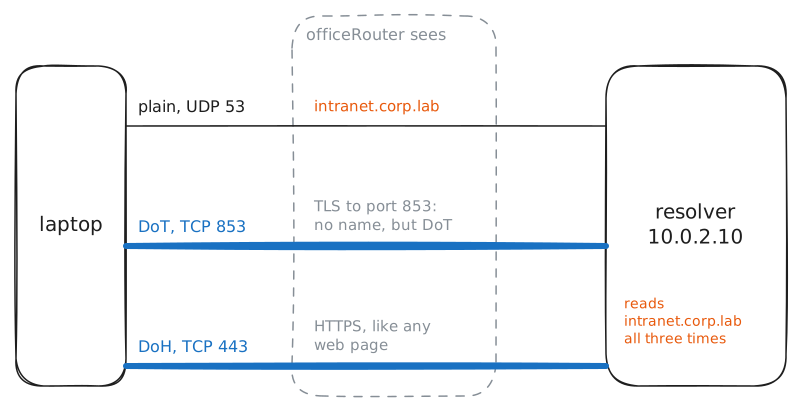
from the path. primaryDns holds the company's zone, corp.lab; secondaryDns copies it, and a Recursive resolver
answers the laptop across officeRouter.
Steps
-
The zone file, as an administrator writes it
Every answer the world gets about
corp.labcomes from one file on primaryDns, the zone, written by hand. A typo there breaks every name at once, so print it, then check it the way an administrator does before each reload.primaryDns:~# cat /var/bind/corp.lab.zone primaryDns:~# named-checkzone corp.lab /var/bind/corp.lab.zone
-
One name, many kinds of record
A name holds more than an address: separate kinds of record say where its mail goes, which host runs a service, or carry free text. Ask the primary,
10.0.2.11, for one kind of record at a time.laptop:~# dig +noall +answer @10.0.2.11 corp.lab MX laptop:~# dig +noall +answer @10.0.2.11 _ldap._tcp.corp.lab SRV laptop:~# dig +noall +answer @10.0.2.11 www.corp.lab AAAA corp.lab TXT
Pro
4 more steps in the app
- The reverse zone: from address to name
- The secondary copies the zone by transfer
- A change: bump the serial, NOTIFY, IXFR
- Sealed lookups: DoT and DoH