 Hack the Route Start free Open app
 The idea
A port picks the program; TCP makes a connection, UDP sends and hopes. A laptop talks through officeRouter to appServer, which runs an echo service (it sends back whatever arrives) and a private admin panel.
Steps
-
Who is listening: ports and sockets
One machine has one IP address but runs many programs, so a packet needs a second number to say which program it is for. List appServer's waiting programs and the number each waits on.
appServer:~# ss -tulnp
-
The TCP handshake, the data, and the goodbye
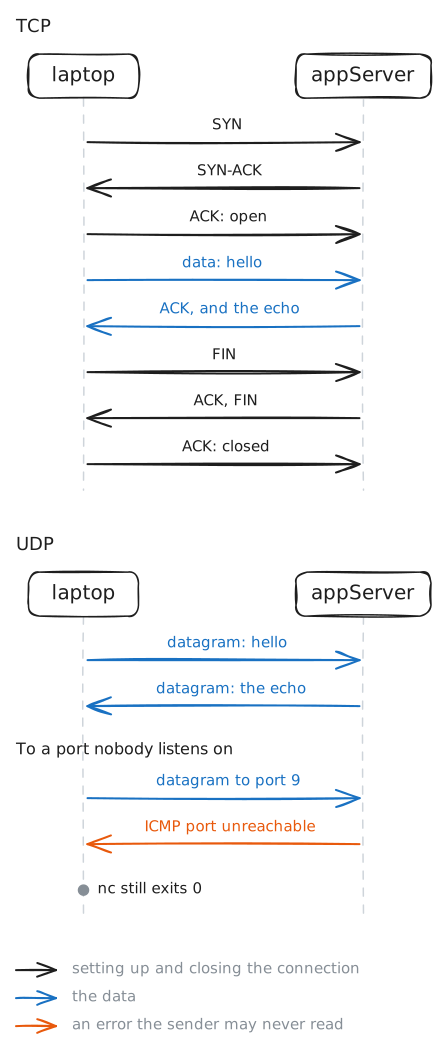
TCP promises that every byte arrives, in order, so the two ends must first agree to talk and keep count. Connect to the echo service, send one word, then Close. The laptop records the packets; read them afterwards to see what crossed before your word.
laptop:~# nc 10.0.2.10 7
laptop:~# tcpdump -nn -r /tmp/hello.pcap
-
Many connections, one server port
A server talks to many clients on one port at once, so something else must keep their replies apart. Start two connections from the laptop to the echo service; each sends its word after 30 seconds. While both are still open, list them and compare their numbers.
laptop:~# nc 10.0.2.10 7
laptop:~# nc 10.0.2.10 7
laptop:~# ss -tn '( dport = :7 )'
-
A closed TCP port: reset
A program needs to know at once when nobody is there, instead of waiting. Nothing listens on port 9 on appServer. Try to open a TCP connection to it from the laptop, and watch how quickly the answer comes back and what it says.
laptop:~# telnet 10.0.2.10 9
-
UDP: one datagram, no promises
UDP skips the handshake: each message goes alone, which is fast but promises nothing. Send a word to the UDP echo on port 7, then the same word to port 9, where nobody listens, and see who tells the laptop that nobody was there.
laptop:~# nc -u -w1 10.0.2.10 7
laptop:~# nc -u -w1 10.0.2.10 9
-
Listening on loopback: private by address
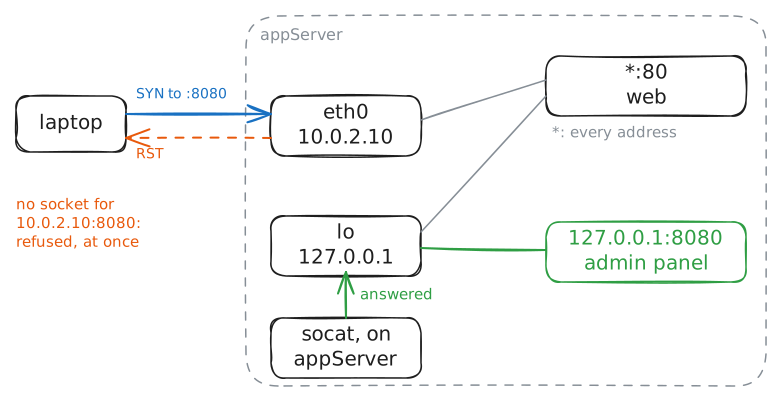
A socket listens on an address as well as a port, and that address decides who may connect at all. The admin panel on port 8080 is running. Try it from the laptop, then from appServer itself, and compare the two answers.
laptop:~# telnet 10.0.2.10 8080
appServer:~# nc 127.0.0.1 8080