 Hack the Route Start free Open app
 The idea
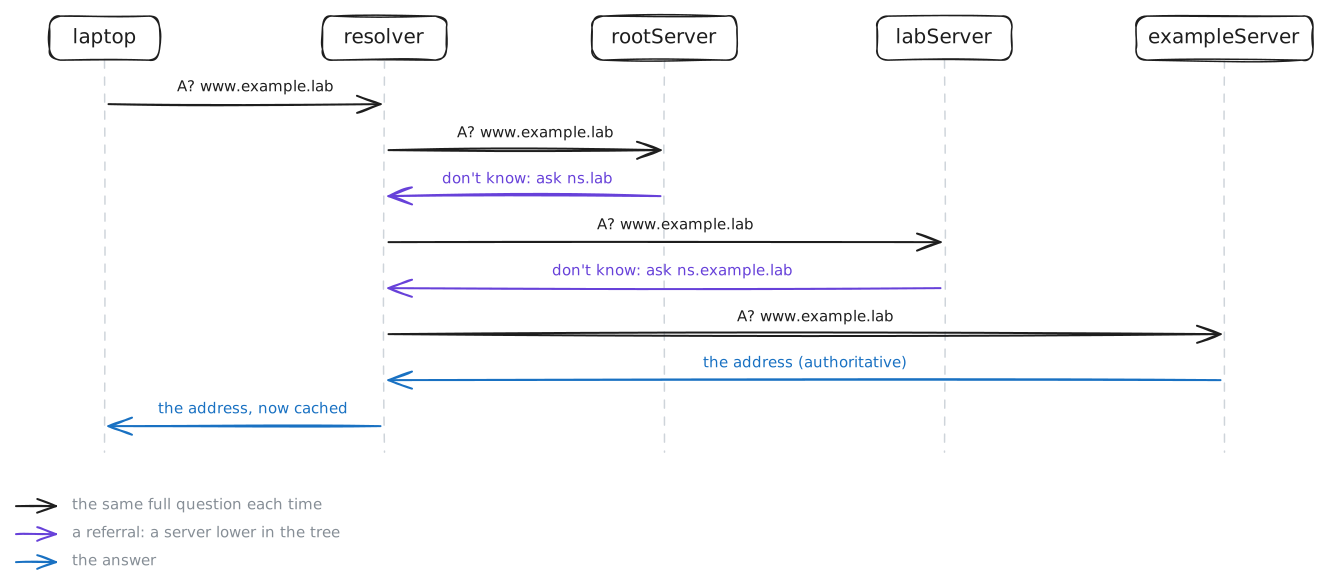
The laptop asks one DNS server, the resolver, for a name. The resolver finds it by walking a tree of servers on the internet (rootServer, labServer, exampleServer), then remembers the answer.
Steps
-
Ask the resolver
A name like
www.example.labis for people; packets need an IP address, so the laptop asks a DNS server to turn one into the other. Ask the laptop's DNS server forwww.example.laband read the whole reply, from its flags to who answered.laptop:~# dig www.example.lab
-
The resolver walks the tree
No server knows every name, so the resolver asks several, from the top of the tree down. Ask again while it records its traffic, and count who it asks. Then the lab makes rootServer drop every DNS question, and the same lookup runs once more.
laptop:~# dig +short www.example.lab
laptop:~# dig +tries=1 www.example.lab
Pro
4 more steps in the app
- Walk it by hand
- The cache, and the TTL
- Aliases: CNAME
- No such name