 Hack the Route Start free Open app
 The idea
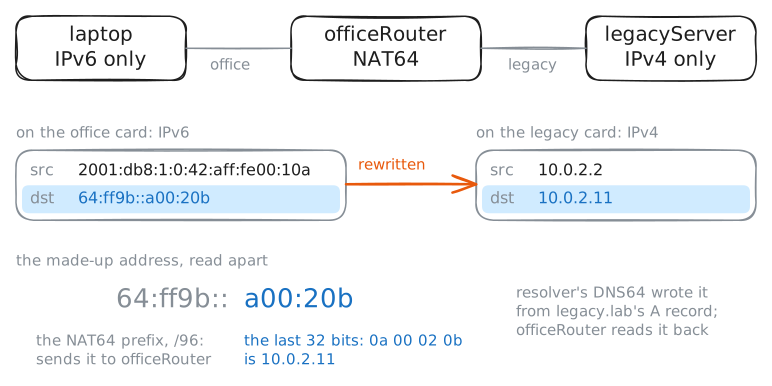
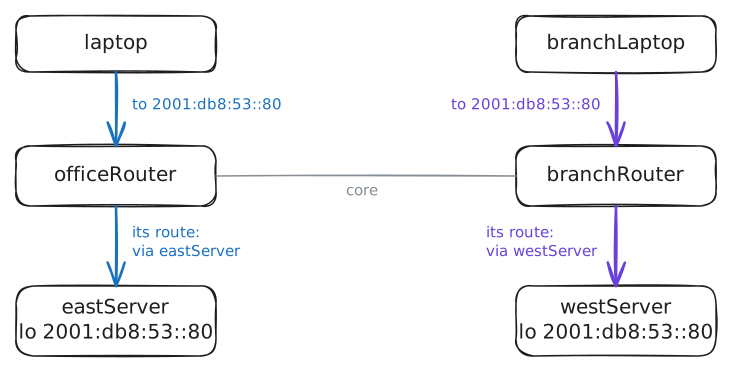
A laptop with only IPv6 reaches legacyServer, which has only IPv4, through officeRouter, a Router, with DNS64 and NAT64. Then eastServer and westServer hold one anycast address, and the laptop and branchLaptop each reach the nearer one.
Steps
-
An IPv6-only laptop, an IPv4-only server
Many new networks run IPv6 only, while many servers still have only IPv4. The laptop has only IPv6, legacyServer only IPv4: list both, then ping legacyServer from the laptop.
laptop:~# ip -br addr show dev eth0
legacyServer:~# ip -br addr show dev eth0
laptop:~# ping -c 1 -W 1 10.0.2.11
-
DNS64: an AAAA record made up from an A record
To connect, the laptop needs an IPv6 address for legacy.lab, which has none: legacy.lab has only an A record, 10.0.2.11, and no AAAA. Ask the laptop's Recursive resolver for both, then legacy.lab's own name server for the AAAA.
laptop:~# dig +short A legacy.lab
laptop:~# dig +short AAAA legacy.lab
resolver:~# dig AAAA legacy.lab @10.0.2.10
Pro
3 more steps in the app
- NAT64: one connection, two IP versions
- Anycast: one address, the nearest server
- The nearer server fails