 Hack the Route Start free Open app
 The idea
A laptop reaches webServer, on another network, through homeRouter, a Router, over IPv4 and IPv6 at once: a dual stack. IPv6 runs beside IPv4 with its own routes, and ICMPv6 is part of how it works.
Steps
-
Across the router with IPv6
webServer is on the other network, so packets cross homeRouter. Ping its IPv6 address from the laptop, then trace the way there, to compare with IPv4.
laptop:~# ping -c1 -W2 fd00:0:2:0:42:aff:fe00:20a
laptop:~# traceroute6 -n fd00:0:2:0:42:aff:fe00:20a
-
IPv6 has its own routes
Each family keeps its own routing table, so one can break alone. The laptop's IPv6 default route goes to the router's
fe80::address; this step deletes it.laptop:~# ip -6 route show default laptop:~# ip -6 route del default laptop:~# ping -c1 -W2 10.0.2.10 laptop:~# ping -6 -c1 -W2 fd00:0:2:0:42:aff:fe00:20a laptop:~# ip -6 route add default via fe80::42:aff:fe00:102 dev eth0 laptop:~# ping -6 -c1 -W2 fd00:0:2:0:42:aff:fe00:20a
Pro
3 more steps in the app
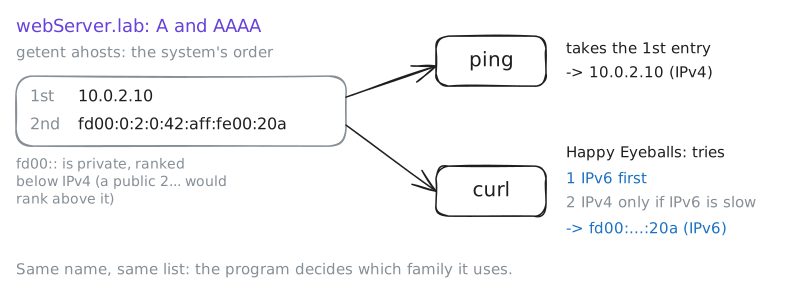
- One name, two addresses
- Which address does a program pick?
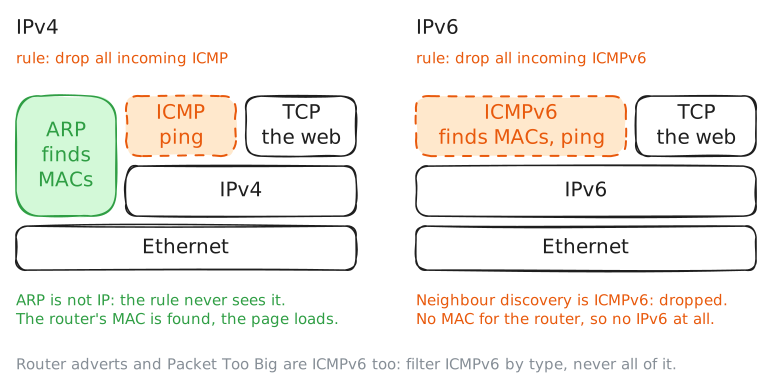
- Drop ICMP, then ICMPv6