 Hack the Route Start free Open app
 The idea
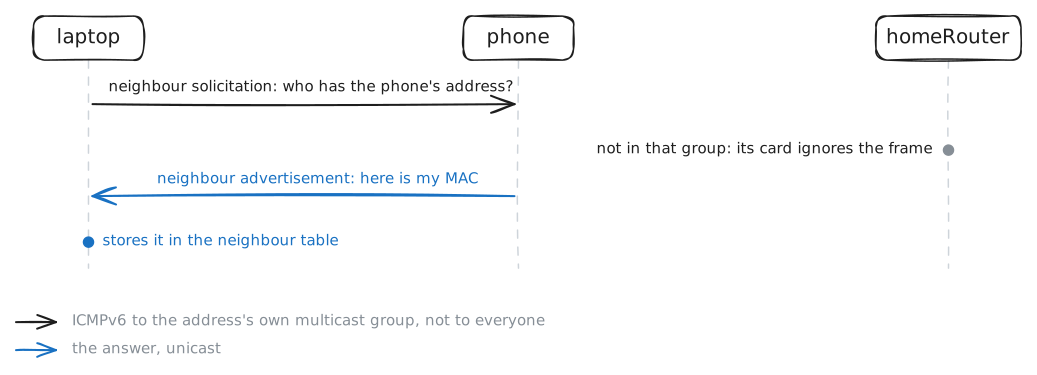
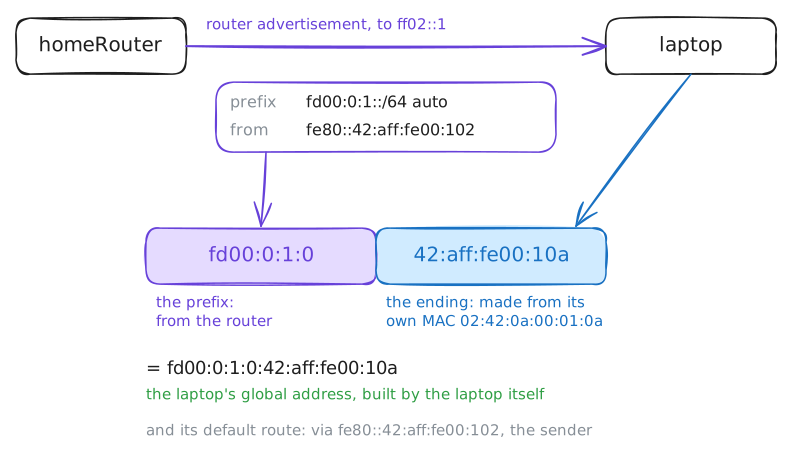
A laptop, a phone and homeRouter, a Router, share one network. You will see IPv6 at work: a card gives itself an address, finds its neighbours with ICMPv6, and learns its network's prefix from the router.
Steps
-
Two IPv6 addresses on one card
Nobody typed an IPv6 address into the laptop. List its IPv6 addresses and its card's MAC address, to see where they came from.
laptop:~# ip -6 addr show dev eth0
laptop:~# ip link show eth0
-
Talking with link-local addresses
Link-local addresses work with no router at all, so neighbours can always talk. Ping the phone's link-local address bare, then with the laptop's card after a
%.laptop:~# ping -c1 -W2 fe80::42:aff:fe00:10b laptop:~# ping -c1 -W2 fe80::42:aff:fe00:10b%eth0
Pro
2 more steps in the app
- Neighbour discovery replaces ARP
- SLAAC: the router announces the prefix