 Hack the Route Start free Open app
 The idea
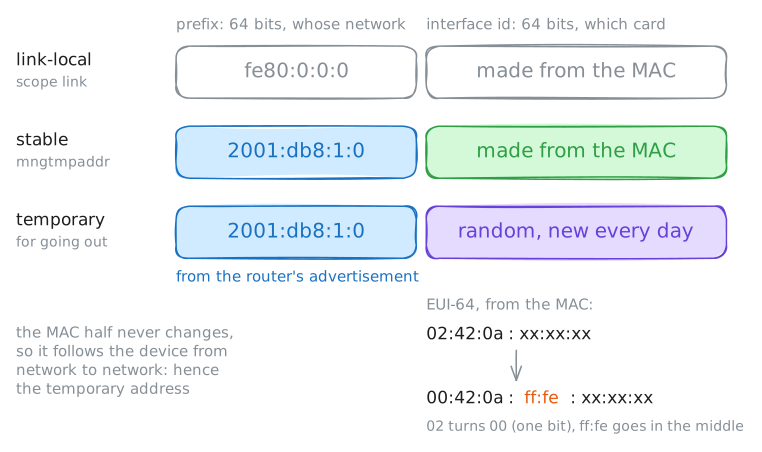
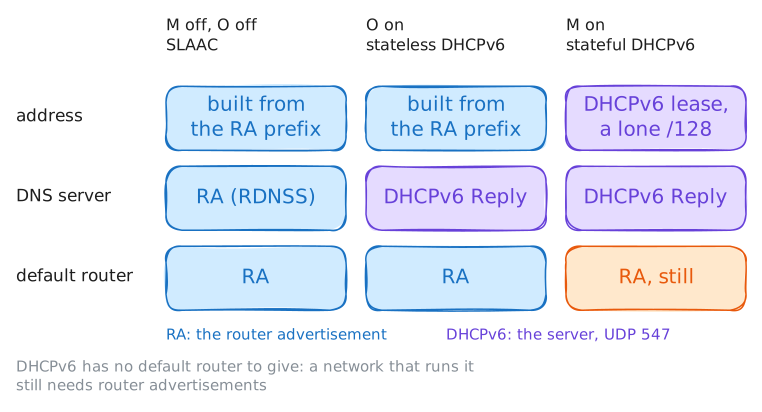
A laptop and a printer share the office network behind officeRouter, a Router, with a web server beyond it. One card holds several kinds of IPv6 address, each from a different source: link-local, SLAAC, temporary, and DHCPv6 when the router says so.
Steps
-
Three addresses on one card
Nobody set the laptop's or the printer's IPv6 addresses, yet each card holds several, built for different jobs. List the laptop's, then the printer's.
laptop:~# ip -6 addr show dev eth0
printer:~# ip -6 addr show dev eth0
-
The groups a card listens to
IPv6 has no broadcast, so it reaches many cards at once with multicast groups instead. List the groups the laptop's card joined, then the router's.
laptop:~# ip -6 maddr show dev eth0
officeRouter:~# ip -6 maddr show dev eth0
Pro
4 more steps in the app
- Temporary addresses for going out
- An address nobody owns: subnet-router anycast
- What the router advertises
- DHCPv6: the M and O flags