 Hack the Route Start free Open app
 The idea
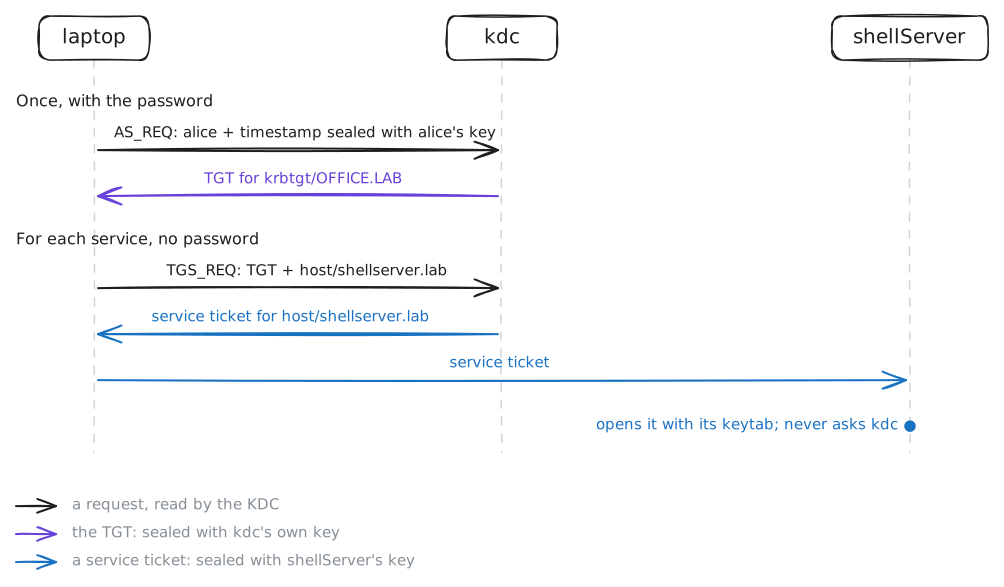
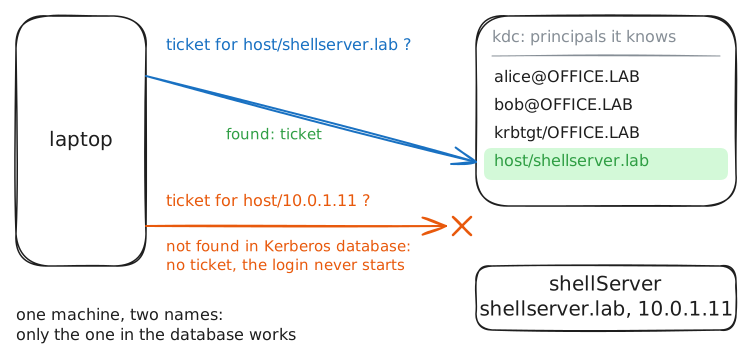
Kerberos is single sign-on inside one network: alice proves who she is with her password once, to the KDC, and with tickets to every service after. Here kerberos tickets come from kdc; the laptop uses them to log in to shellServer, and then meets what Kerberos is strict about: keys, names and the clock.
Steps
-
kinit: one password for a ticket-granting ticket
kinitis the one time alice's password is used. The laptop asks the KDC's Authentication Service for a TGT, a ticket to the KDC's own ticket service, sealed with the KDC's key. Get one while the KDC records UDP 88, list it, then read the KDC's log of the request.laptop:~# kinit alice laptop:~# klist kdc:~# tail -2 /var/log/krb5kdc.log
-
A ticket per service, from the TGT
alice logs in to the shell server with no password. The laptop takes its TGT to the KDC's Ticket-Granting Service and asks for a ticket to
host/shellserver.lab, sealed with the server's key. Log in, list the cache, then read the KDC's log line for the trade.laptop:~# gss-client -port 4444 shellServer.lab host@shellserver.lab hello laptop:~# klist kdc:~# tail -1 /var/log/krb5kdc.log
Pro
4 more steps in the app
- The server's key lives in its keytab
- Names must match exactly
- Every ticket expires, and the clock is watched
- A rotated key the keytab does not have