 Hack the Route Start free Open app
 The idea
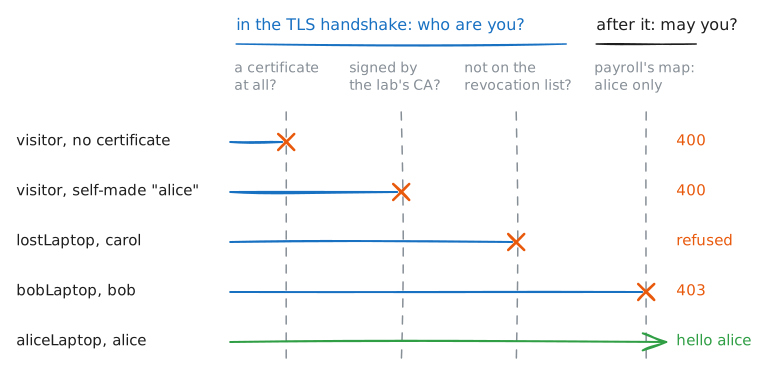
Zero trust means being on the network grants nothing: every service checks who is calling, on every connection. payroll and wiki ask every caller on one flat office network for a certificate from the lab's CA. aliceLaptop and bobLaptop get in by the names in theirs; the visitor, a self-made certificate and carol's lost laptop get nothing.
Steps
-
Reaching the port is not access
The visitor is on the same office network, and nothing blocks it. The old model trusts whoever is inside. Here the check is mutual TLS (mTLS): the client checks the server's certificate, as in any HTTPS, and the server asks for the client's too. Check that payroll's Port is open from the visitor, then ask for its front page.
visitor:~# nc -zv payroll.lab 443
visitor:~# curl -sS https://payroll.lab/
-
An enrolled device proves who it is
alice's laptop was enrolled: the lab's issuing CA signed a certificate naming alice, for client authentication only, and its private key was made on the laptop and stays there. Read the certificate, then ask payroll for its page with it.
aliceLaptop:~# openssl x509 -in /etc/identity/certificate.pem -noout -subject -issuer -ext extendedKeyUsage
aliceLaptop:~# curl -sS --cert /etc/identity/certificate.pem --key /etc/identity/key.pem https://payroll.lab/
Pro
3 more steps in the app
- Who you are decides what you reach
- A made-up certificate proves nothing
- A revoked certificate is refused